







Over the past few months, Microsoft has changed its stance on password recommendations. Microsoft now recommends that passwords are not ever set to expire automatically. The reason for this is when users are required to change their password at a regular interval, e.g., every 90 days, they often use the same password but change only a number at the end. This leads to insecurity as the password could easily be a commonly guessed password, and the account would be vulnerable to hijacking.
Instead Microsoft suggests alternatives to automatically expiring passwords—including Azure Active Directory Password Protection, which is built into Microsoft’s cloud identity platform, and multi-factor authentication (MFA)—as ways to better secure your accounts and data.
Azure AD Password Protection helps eliminate bad passwords within your organization by banning specific, easily-guessed passwords, using custom lists that the administrator creates. This feature also translates to when you are using Azure AD Connect to synchronize user identities up to Azure (also known as a hybrid scenario). You can install Azure AD Password Protection for Windows Server Active Directory to extend the password lists to on-premises users as well.
Not all these features are included with standard Azure AD licenses; if you want to use the custom lists or employ on-premises password protection, you will need to purchase Azure AD Premium Plan 1 or higher.
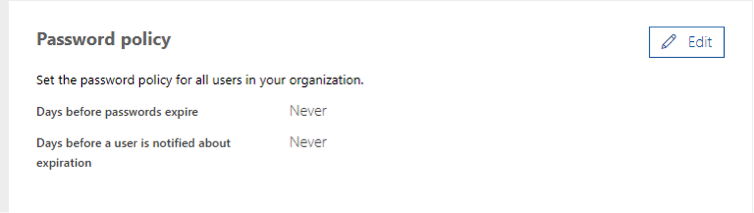
These changes can be seen already with newly created Office 365 tenants, as seen below.
 Also, the latest builds of Windows 10 and Windows Server 2019 have been changed so they no longer require password changes.
Do you have a poor password policy for your organization? Have you been compromised in the past and are you looking to better secure your environment? Contact the Sikich team so we can begin our journey together in creating a better and more secure infrastructure for your organization.
This publication contains general information only and Sikich is not, by means of this publication, rendering accounting, business, financial, investment, legal, tax, or any other professional advice or services. This publication is not a substitute for such professional advice or services, nor should you use it as a basis for any decision, action or omission that may affect you or your business. Before making any decision, taking any action or omitting an action that may affect you or your business, you should consult a qualified professional advisor. In addition, this publication may contain certain content generated by an artificial intelligence (AI) language model. You acknowledge that Sikich shall not be responsible for any loss sustained by you or any person who relies on this publication.