







NetSuite is releasing Invoice Groups as a new feature in their 2020.2 release. Invoice grouping has been a desired feature for many of our clients over recent years. NetSuite users had to resort to the Consolidated Invoicing SuiteSolution if they wanted to group invoices for their customers. This will no longer be the case with the new invoice grouping feature, which is clean, easy to use, and will continue to be enhanced by NetSuite.
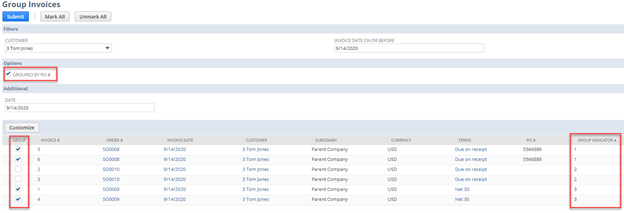
The invoice grouping feature allows you to group existing invoices that share the same Customer, Currency, Terms, Subsidiary, and Bill To. Invoices also have the option to be grouped by PO number. NetSuite automatically designates the invoice group based on its characteristics, but users can select whether to include individual invoices in a group. An important limitation to note is that invoices not created from a sales order cannot be grouped. This is noted as a future enhancement by NetSuite. The screenshot below shows the Group Invoices user interface in NetSuite. Filters can be selected to narrow down the list of invoices for grouping. The possible invoice groups are displayed in the Group Indicator column. Indicate invoices for grouping by selecting the checkbox in the Group column.
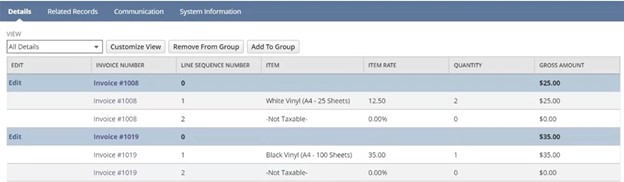
Once invoices have been selected to be grouped and submitted, the invoice group record is created. The invoice group displays summary and detailed invoice data (screenshot below). Invoices can be added and removed from the invoice group if required characteristics are shared. The group invoice record supports Advanced PDF form customization, record numbering options, SuiteScript, and SuiteFlow features.
Invoice groups can accept full or partial payments. When accepting payment for an invoice group, individual invoices are selected, like the standard functionality of accepting payments in NetSuite. An invoice that is part of an invoice group cannot individually accept payment. All payments must be created through the invoice group. After applying a payment to an invoice, the invoice cannot be removed from the invoice group. Credit memos cannot be created from an invoice group but can be applied to invoices that are included in an invoice group.
The release of this new feature in update 2020.2 will relieve many pain points users were experiencing when trying to group invoices in NetSuite previously. This feature will continue to be enhanced and expanded by NetSuite going forward.
This publication contains general information only and Sikich is not, by means of this publication, rendering accounting, business, financial, investment, legal, tax, or any other professional advice or services. This publication is not a substitute for such professional advice or services, nor should you use it as a basis for any decision, action or omission that may affect you or your business. Before making any decision, taking any action or omitting an action that may affect you or your business, you should consult a qualified professional advisor. In addition, this publication may contain certain content generated by an artificial intelligence (AI) language model. You acknowledge that Sikich shall not be responsible for any loss sustained by you or any person who relies on this publication.