







It may be necessary to find which switch port a device is plugged into by using its IP address. There could be a compromised device generating too much traffic in your network. It may just be that documentation is being created. This blog shows how to do so in a Cisco environment trying to find the IP address 10.1.4.40. To find the port you must already have a good understanding of the network topology and have access to the switches CLI. First connect using putty to the core switch of the site that is doing the routing.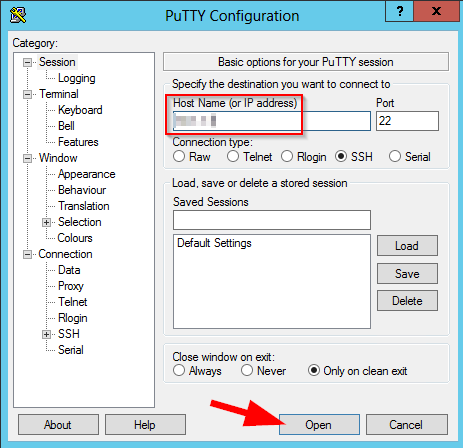
Once connected run:
show ip arp <ip address>
If it returns no entry, then generate traffic to the IP address by pinging the IP address and rerun the command. The example below shows searching for IP address 10.1.4.40.
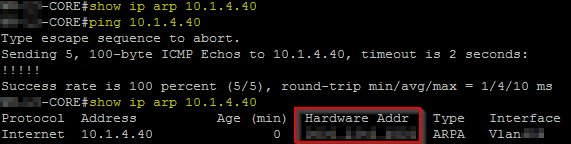
This will show the mac address of the device. Now show the mac address table of the switch by entering either (depending on the code versions):
show mac address-table address <mac-address>
show mac-address-table address <mac-address>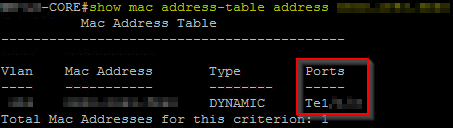
This will either give the exact port the device is plugged into or the port of the next switch in line it is plugged into. This is where knowing your network topology is important. We could use the command “show cdp neighbor” to find if this port is connected to another switch. In this example we found the port plugged into another switch which will likely be the case as end user devices are not likely to be plugged into your main core switch.
Here we see the local interface port Ten 1/X/X is connected to another switch (which is model WS-C2960X switch) and the port that interconnects the two switches is Gi1/0/49.
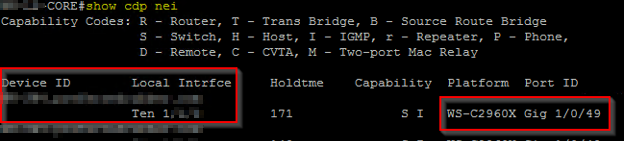
We have discovered that the device is not plugged into the core switch so we must connect to the next switch in line to find what port it may be plugged into.
Connect to the other switch via putty in the same way we connected to the first.
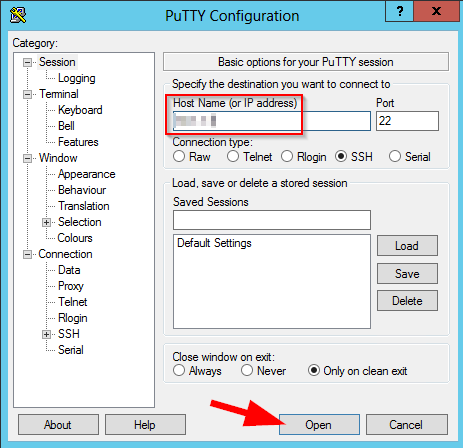
Run the same command as before to look at the mac address table.
show mac address-table address <mac address>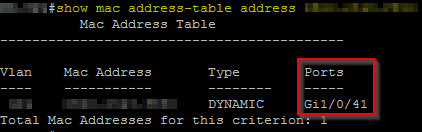
Here we find it in port Gi1/0/41. Again, know the topology of your network to know if this is not another switch uplink. We can verify that with a show cdp neighbor command.
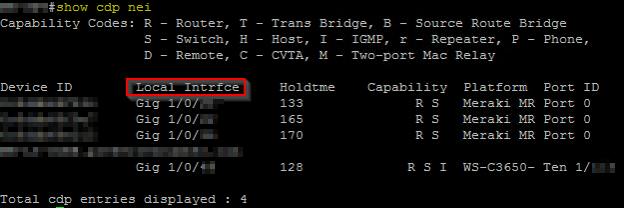
From this switch we can see there are a few Meraki MR access points plugged into it, and we see our connection back to the core switch. We do not see anything plugged into port Gi1/0/41 so this must be the port we are looking for.
Have any questions? Don’t hesitate to contact one of our experts!
This publication contains general information only and Sikich is not, by means of this publication, rendering accounting, business, financial, investment, legal, tax, or any other professional advice or services. This publication is not a substitute for such professional advice or services, nor should you use it as a basis for any decision, action or omission that may affect you or your business. Before making any decision, taking any action or omitting an action that may affect you or your business, you should consult a qualified professional advisor. In addition, this publication may contain certain content generated by an artificial intelligence (AI) language model. You acknowledge that Sikich shall not be responsible for any loss sustained by you or any person who relies on this publication.