







Tired of keeping dozens of browser tabs open to access your most-used web apps? Many popular websites can now be installed and run like native desktop apps for easy access and convenience.
In this post, I’ll use a common password manager as an example to show how to turn a webpage into its own dedicated desktop application. I’ll also discuss the advantages of running websites as apps and provide a step-by-step guide for using Microsoft Edge’s built-in web app installation feature.
Why Run Websites as Apps?
There are several advantages to packaging websites and web services as installable desktop applications:
- Single-click access without needing to open your browser first. You can launch web apps directly from your desktop, taskbar, or start menu for quick access.
- Sites open in their own browser instance, separate from your normal browser. This keeps them isolated from other tabs for a distraction-free experience.
- You get native operating system integration and features like notifications, uninstall capabilities, and offline access support.
- Web apps provide a focused experience without tab clutter from your main browser window.
For a daily productivity tool like a password manager, calendar, or email client, having a standalone installable app can be much more convenient than constantly opening a browser tab and re-authenticating.
Using Microsoft Edge to Easily Install Web Apps
The easiest way to install websites as desktop apps is by using Microsoft Edge’s built-in “Install this site as an app” option.
To do this for a site such as LastPass:
- Visit lastpass.com in Edge and click the three-dot “More actions” menu.
- Click “Apps” from the dropdown menu.
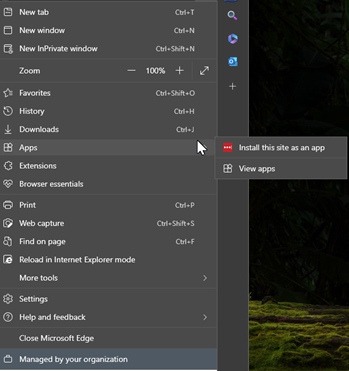
- Select “Install this site as an app” and confirm your choice. Pick a custom name if desired.
- The LastPass web app will be installed to your apps list, desktop, taskbar, start menu and can even be set to auto-start on login.
Chrome has similar functionality under its three-dots “Save and share” menu:
- Save and share
- Create Shortcut…
- Open as window
No complicated steps needed. Edge handles the conversion process automatically using modern web technologies under the hood.
Once installed, these web apps work like any other desktop application. They can be launched, customized, pinned, and may even work offline without an internet connection depending on the site’s implementation.
Many popular websites and web tools work great when installed as desktop apps. So next time you find yourself juggling too many open browser tabs, consider “appifying” your most used sites for easier access. Give it a try in Microsoft Edge!
This publication contains general information only and Sikich is not, by means of this publication, rendering accounting, business, financial, investment, legal, tax, or any other professional advice or services. This publication is not a substitute for such professional advice or services, nor should you use it as a basis for any decision, action or omission that may affect you or your business. Before making any decision, taking any action or omitting an action that may affect you or your business, you should consult a qualified professional advisor. In addition, this publication may contain certain content generated by an artificial intelligence (AI) language model. You acknowledge that Sikich shall not be responsible for any loss sustained by you or any person who relies on this publication.