







Hyperlinks within HTML tables from emails generated from Power Automate can enhance the user experience and make your content more interactive. We’ll cover the steps needed to achieve adding a visual pleasing clickable link within an HTML table. This will allow users to be more efficient when interacting with these emails.
Note: Steps in this guide reference a previous article.
Step-by-Step Guide to Create Your Flow
- Create a Table (see “Using HTML Tables in Power Automate to Display Active Leads that Require Follow Up”)
- In the “Select” stage from the previous article, add a new line labeled “Link.”
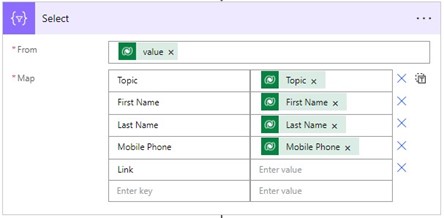
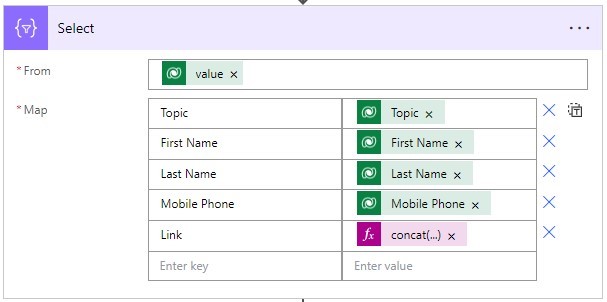
- In the Link value, we need to add a concatenation expression to create our hyperlink.
- In the Dynamics 365 Sales Hub, select an existing Lead record, and copy the URL except for the record ID (the string of letters and numbers at the end of the URL)
- Add the URL to the expression below:
concat('<a href="your lead record url not including the record ID',item()?['leadid'], '">Link to item</a>')
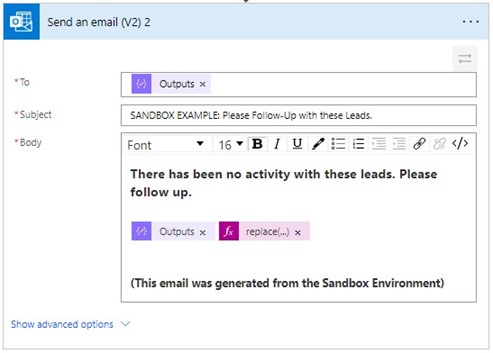
- Now in the body of the email we need to add another expression that cleans up the format of the URL.
- Replace the Output that references the “Create HTML table” and add the expression below:
replace(replace(replace(body('Create_HTML_table'), '<', '<'), '>', '>'), '"', '"')
- Run the automation and review the result.
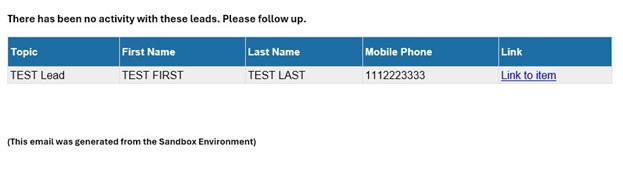
- Click the “Link to item” button and verify you are taken to the record.
Conclusion
With these steps, you can create a functional HTML table with hyperlinks in your automated emails from Power Automate, making your data presentation clear and interactive. Remember to test your email, created in Power Automate, thoroughly to ensure all links are working as expected.
This publication contains general information only and Sikich is not, by means of this publication, rendering accounting, business, financial, investment, legal, tax, or any other professional advice or services. This publication is not a substitute for such professional advice or services, nor should you use it as a basis for any decision, action or omission that may affect you or your business. Before making any decision, taking any action or omitting an action that may affect you or your business, you should consult a qualified professional advisor. In addition, this publication may contain certain content generated by an artificial intelligence (AI) language model. You acknowledge that Sikich shall not be responsible for any loss sustained by you or any person who relies on this publication.