







A new Enhanced Backup Policy is available for Azure VMs, which is designed to supplement the existing Standard Backup Policy. The new backup features which come with the Enhanced Backup Policy have been in preview for a while and moved to general availability in the last few months.
This is great news for those of us who have moved a lot of on-premises VM workloads to Azure in recent years. One of the pain points in moving VMs to Azure has been the native backup support (or rather, the lack of it) for VMs. The built-in Standard Backup support of the Recovery Services Vault provides only very rudimentary backup functions of a VM.
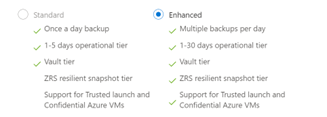
As you can see in the above screen capture, standard backup policy can perform only one backup daily. This is far from what IT teams need to meet the backup requirements of their operation today.
Pros
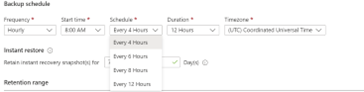
One of the most significant features added to the Enhanced Backup Policy is the ability to perform multiple backups daily, as frequently as every four hours. With the Standard Backup Policy, we would need to use an Azure Automation object to run a PowerShell script in order to achieve multiple backups daily. That solution worked, but it was somewhat messy and required PowerShell scripting.
It took some time for Microsoft to introduce this needed backup feature to Azure VM workloads. It is not perfect, especially compared to some third-party backup solutions, but it is getting closer.
Cons
There is one big caveat of this new Enhanced Backup Policy—it is only available to VMs that have NO existing backups. This should not be an issue for newly created VMs. However, for existing VMs that already have backups via Standard Backup Policy, you will need to delete ALL the backups from the vault and start a fresh new backup.
In conclusion, it is a good idea to start using the Enhanced Backup Policy for ALL newly created Azure VM workloads. It also is smart to start planning a migration strategy to change existing Standard Backups to use the Enhanced Backup Policy. If backup retention is not critical, consider starting a new fresh backup with the Enhanced Backup Policy on existing VMs.
Have any questions about the Enhanced Backup Policy for Azure VMs? Please reach out to us for assistance at any time!
This publication contains general information only and Sikich is not, by means of this publication, rendering accounting, business, financial, investment, legal, tax, or any other professional advice or services. This publication is not a substitute for such professional advice or services, nor should you use it as a basis for any decision, action or omission that may affect you or your business. Before making any decision, taking any action or omitting an action that may affect you or your business, you should consult a qualified professional advisor. In addition, this publication may contain certain content generated by an artificial intelligence (AI) language model. You acknowledge that Sikich shall not be responsible for any loss sustained by you or any person who relies on this publication.