







Managing your sales team’s commission in NetSuite can be done easily and effectively by adding the Incentive Compensation Module into your current NetSuite environment. An administrator can activate this feature, and immediately integrate it into your sales operations once purchased from NetSuite. The module allows you to design, track, and pay your sales commissions through commission plans and schedules. You may calculate your commissions based off quota, quantity sold, service item, product profitability, and more. Also, every commission plan may also have multiple commission schedules within it, as illustrated below.
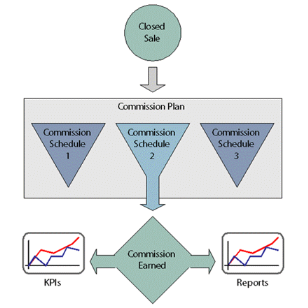
How ever complicated your sales commission calculations may be, the incentive compensation module gives you the versatility to customize it to your exact business process and allows you to change it whenever you see fit. Along with the calculation versatility, you may customize when in the sales process you want the commission to be calculated, and when they will be paid. For example, if you prefer the commissions payable to be generated upon Sales Order approval, rather than Bill Collection, that’s entirely up to you.
The Incentive Compensation Module is also very useful for companies that may need to motivate their sales team with incentives. The Sales reps can forecast their earnings, and these can be set to align with company goals. The added visibility for both the sales team themselves and finance makes reporting effortless, and eliminates any tedious manual calculations. Finance will have access to Commission Overview Reports, Paid Employee Commissions Reports, Commissions on A/P Aging Reports, and more. This will allow them to quickly monitor sales trends.
If your company is looking for more visibility in their sales commission information, is wasting time with manual calculations, or simply deals with a large quantity of commission, the Incentive Compensation Module may be a NetSuite tool worth utilizing. If you would like more information about the Incentive Compensation Module or anything else with NetSuite, please contact us at any time! You can also learn about more great tips for NetSuite on our YouTube playlist or our other blog posts.
This publication contains general information only and Sikich is not, by means of this publication, rendering accounting, business, financial, investment, legal, tax, or any other professional advice or services. This publication is not a substitute for such professional advice or services, nor should you use it as a basis for any decision, action or omission that may affect you or your business. Before making any decision, taking any action or omitting an action that may affect you or your business, you should consult a qualified professional advisor. In addition, this publication may contain certain content generated by an artificial intelligence (AI) language model. You acknowledge that Sikich shall not be responsible for any loss sustained by you or any person who relies on this publication.