







For years and years of installing and renewing SSL certificates on servers and firewalls, at the end of the day I would also go look and make sure the thumbprint of the SSL certificate matched up to what you expected it to be along with documenting the thumbprint for others.
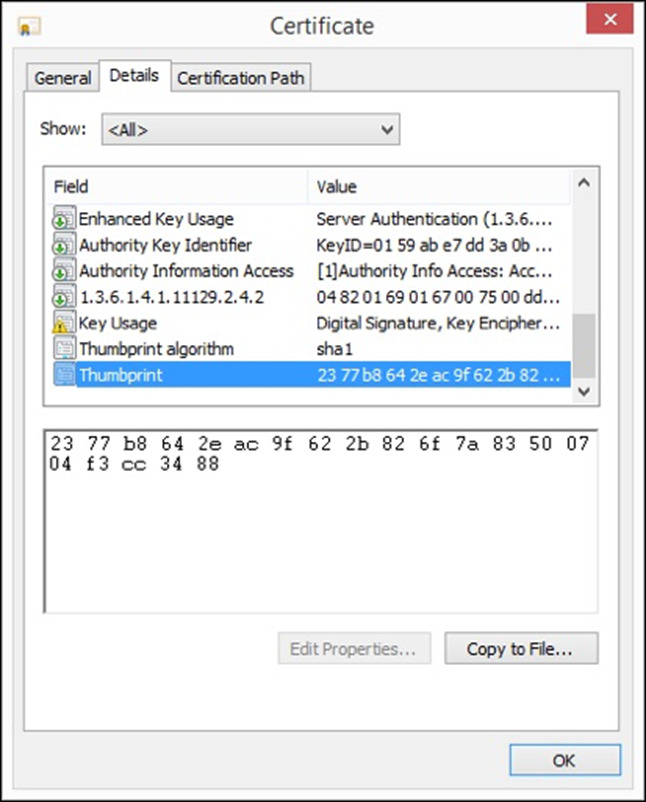
In my most recent SSL certificate deployment, I went to do just that, and my browsers of choice (Chrome and Edge) both failed me when going to inspect the freshly installed SSL certificate. There simply is no parameter of a thumbprint any longer. In its place are a SHA256 Fingerprint and a SHA1 Fingerprint.
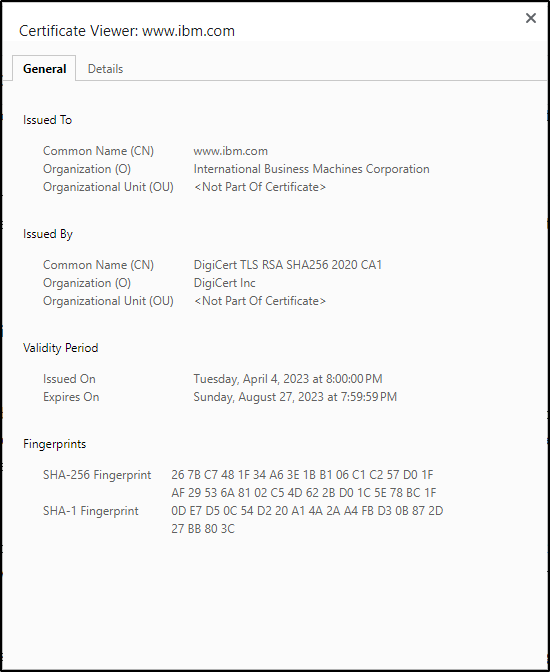
Note: I’m not implying I installed IBM’s certificate. This is just a sample view of what is shown when inspecting an SSL certificate now in an HTML5 browser.
So, what’s happened? Are these the same thing but just different labels?
As it has been referenced for years and years, a thumbprint is 20 pairs of hexadecimal values. This is simply a hash of what the certificate itself was. No other certificate should have this same value. This matches up to what is now referred to as a SHA1 fingerprint. In fact, even looking at the screen shot from above, the Thumbprint algorithm reports as SHA1.
So now we have transitioned to certificates reporting two values for a thumbprint or fingerprint. The SHA1 value is the same as the traditional thumbprint and the SHA256 is based on the SHA2 standard. The SHA2 fingerprint is 32 pairs of hexadecimal values, giving a unique representation of what the certificate itself is.
Unfortunately, there weren’t enough fathers in the room advocating for the potential dad joke when coming up with labeling. Who has two thumbprints and a certificate? This guy.
This publication contains general information only and Sikich is not, by means of this publication, rendering accounting, business, financial, investment, legal, tax, or any other professional advice or services. This publication is not a substitute for such professional advice or services, nor should you use it as a basis for any decision, action or omission that may affect you or your business. Before making any decision, taking any action or omitting an action that may affect you or your business, you should consult a qualified professional advisor. In addition, this publication may contain certain content generated by an artificial intelligence (AI) language model. You acknowledge that Sikich shall not be responsible for any loss sustained by you or any person who relies on this publication.