







Do you have vendors that require deposits before they will begin work on a project for you? NetSuite now has the ability to not only record these prepayments in a way that is easy to report on, but also allows for the automatic application of them to their associated vendor bills, reducing manual efforts and saving time.
In order to automatically apply it to a vendor bill, a Purchase Order and Vendor Prepayment must be linked. This can be done by creating a new prepayment and selecting a Purchase Order in the new “Purchase Order” field.
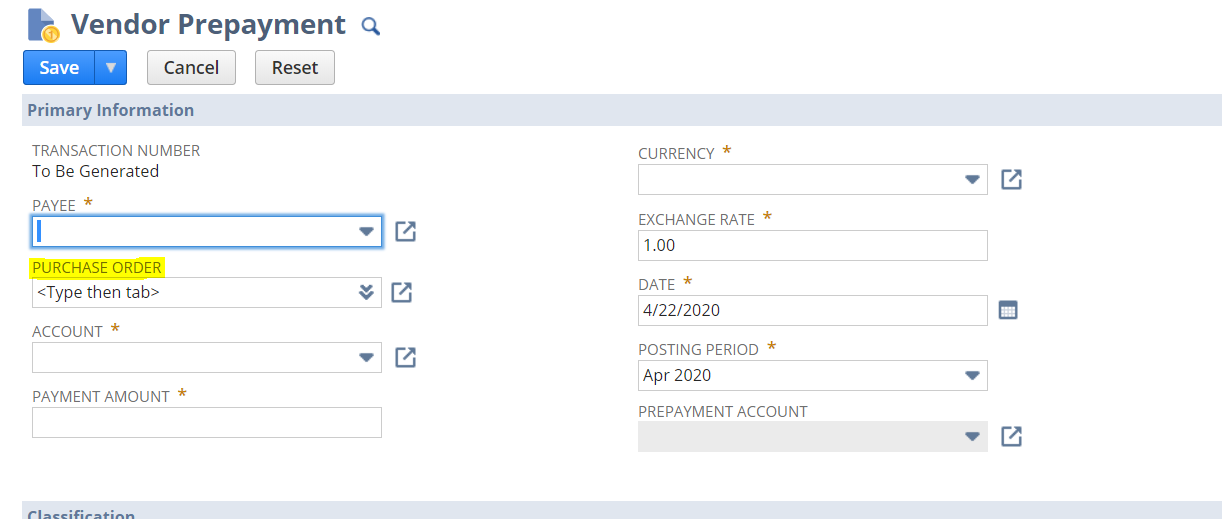
Once the you apply the prepayment, it is not possible to change the linked Purchase Order. However, it is possible to manually apply a remaining amount to a Bill that is from a different Purchase Order as long as it has the same Vendor, Currency and Subsidiary.
Some additional enhancements include the following:
- The ability to allow for Vendor Bills to be approved in the Employee Center role (this permission must be manually enabled as it is not a default permission);
- Support for Custom GL Lines;
- Improved validations to minimize errors when multiple users work with vendor prepayments concurrently; and
- Exposure of Vendor Prepayment records in SuiteScript.
Setting Up NetSuite Vendor Prepayments
To start using NetSuite Vendor Prepayments:
- Navigate to Setup > Company > Enable Features > Accounting > Advanced Features and check the Vendor Prepayments box.
- Set up a Vendor Prepayment account
The Auto-Apply Vendor Prepayments preference will be set by default for all prepayment transactions that meet the Auto-Apply conditions. If your settings to not meet the conditions, you will have to manually apply the prepayment. If you want only to apply manual payments, you must turn off the Auto-Apply preference by navigating to Setup > Accounting > Preferences > Accounting Preferences > Accounts Payable.
Have any questions about NetSuite vendor prepayments? Please contact us at any time!
This publication contains general information only and Sikich is not, by means of this publication, rendering accounting, business, financial, investment, legal, tax, or any other professional advice or services. This publication is not a substitute for such professional advice or services, nor should you use it as a basis for any decision, action or omission that may affect you or your business. Before making any decision, taking any action or omitting an action that may affect you or your business, you should consult a qualified professional advisor. In addition, this publication may contain certain content generated by an artificial intelligence (AI) language model. You acknowledge that Sikich shall not be responsible for any loss sustained by you or any person who relies on this publication.