







Microsoft Teams, a chat-based workspace in Microsoft’s Office 365 that integrates people, content and tools for your team, also allows businesses to safely and easily collaborate with people outside of the organization. Companies have three options for granting access to outside users:
- External Access
- Guest Access
- Shared Channels
Companies must understand the difference between the three to appropriately take advantage of the different access types.
External Access vs. Guest Access
At first glance, it may seem like External and Guest Access are the same. However, they are different, and each offers distinct benefits for your company.
Microsoft Teams External Access
Microsoft defines External Access as the ability for users to find, call and chat with people in other organizations.
For example, if your company uses Teams, and another business grants you External Access to their Teams account, you can seamlessly access the people in the other organization inside the Teams app to effectively communicate with the other business. You can find, call and chat with people from the other business when needed.
However, you will not have access to that organization’s Teams, Channels or resources, such as files and planning, that requires Guest Access.
Three settings are available for External Access: open federation, allowing specific domains and blocking specific domains.
- Open federation – This is the default setting for Teams and allows external users to find, call and chat with people in your organization in any domain.
- Allow specific domains – In this setting, you must add domains to an Allow list. This limits external user access to ONLY the allowed domains.
- Block specific domains – Similar to allowing specific domains, companies must add domains to a Block list, granting external users access to all domains NOT on the list.
Microsoft Teams Guest Access
Microsoft defines Guest Access as the ability for users to invite people from outside your organization to join a team. People outside your organization can access existing teams and channels in the Teams app.
Anyone with an email address can be given Guest Access and gain access to team chats, meetings and files they have been invited to. The admin can limit guests’ access in the Guest Access settings.
While some settings for Guest Access can be changed, there are some default settings. Guests in teams won’t have access to:
- OneDrive for Business
- People search outside of Teams
- Calendar
- Scheduled meetings
- Meeting details
- Browse for a team
- Create a team
Which is the Right Choice? Teams External Access vs. Guest Access
External and Guest Access options aren’t mutually exclusive, and your company can benefit from using both. However, each option helps determine the scope of your collaboration efforts.
External Access is the best option when you are trying to communicate ad hoc without signing into a different organization, rather than collaborate on files. Users with External Access can contact people in multiple organizations outside of your company to communicate effectively.
Guest Access is the best option when you are looking to give an individual user the ability to communicate AND collaborate on company files. Guests can participate in channel communication, use private chats, share channel files and have access to teams’ resources. Guest users can be given the same capabilities as native team members with the proper settings.
Here are the key differences between External and Guest Access.
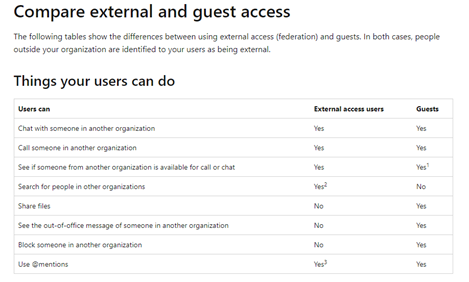
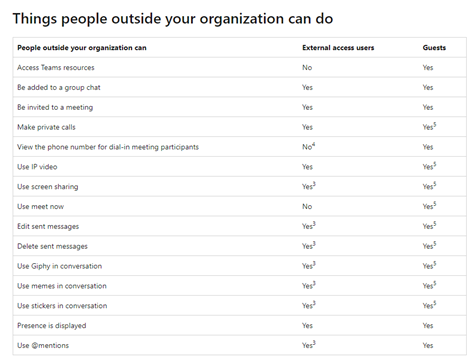
Microsoft Teams Shared Channels
Shared Channels in Microsoft Teams is a new feature that allows administrators to invite people from other teams into their channel. For example, sales and marketing teams could work together in a Shared Channel. Guests can’t be added to a Shared Channel; however, you can invite people outside your organization to participate by using Azure AD B2B direct connect.
Shared Channels are a great alternative to Guest Access because they eliminate the limitations of the Guest Access experience. This includes users having to sign out of their primary Office365 account and into the guest account.
Here is what each member type can do in a Shared Channel:
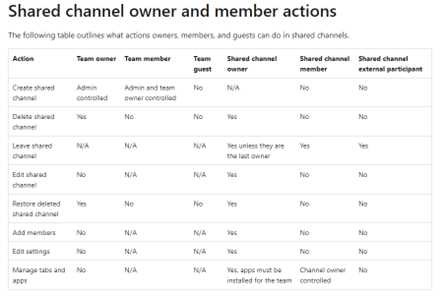
Questions? Reach out to one of our experts today. As one of Microsoft’s top 20 Office 365 partners, we have implemented Office 365 for more than 1,000 organizations. Learn more.
This publication contains general information only and Sikich is not, by means of this publication, rendering accounting, business, financial, investment, legal, tax, or any other professional advice or services. This publication is not a substitute for such professional advice or services, nor should you use it as a basis for any decision, action or omission that may affect you or your business. Before making any decision, taking any action or omitting an action that may affect you or your business, you should consult a qualified professional advisor. In addition, this publication may contain certain content generated by an artificial intelligence (AI) language model. You acknowledge that Sikich shall not be responsible for any loss sustained by you or any person who relies on this publication.