







If you’re not familiar with the RD Gateway role, it is used for secure connectivity to Remote Desktop Services via the Internet. Beginning with Windows 2012, three types of transports are supported through the RD Gateway. The three types of transports are:
- RPC over HTTP – used with RDP 7.1 and previous clients, or when connecting to a Windows 2008 R2 RD Gateway.
- HTTP – RDP 8.0 clients always use HTTP as the default transport, falling back to RPC over HTTP if the pure HTTP transport is not available. The HTTP transport uses the Secure Sockets Layer to establish secure connections between the remote desktop client and the remote desktop server through RD Gateway. This transport type is available starting with Windows 2012.
- UDP – Requires the RDP 8.0 or newer client and a RD 2012 or newer Gateway.
You can view your RD Gateway Transport settings by opening the properties of the RD Gateway Server from the Remote Desktop Gateway Manager, then clicking on the Transport Settings tab.
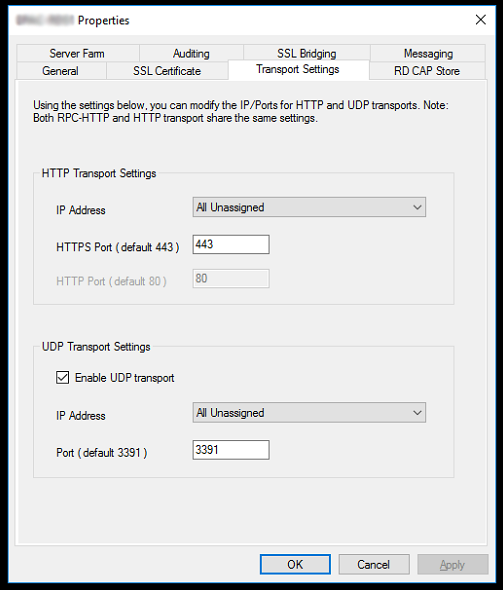
By default, UDP transport is enabled over port 3391. Many deployments I’ve seen have UDP enabled on the server, but do not have their Internet firewall configured to allow the traffic. Allowing the UDP transport has the benefit of supporting real time traffic over high latency networks. The HTTP and UDP transports are more efficient than RPC over HTTPS, which means they provide the end user with a better experience over low bandwidth or a poor performing Internet connection.
There are a couple of configuration items you should be aware of if you plan to open up UDP traffic.
- You cannot disable the HTTP transport because UDP connections can’t be created as stand-alone. UDP connections are established only after a main HTTP connection has been created between the remote desktop client and the remote desktop server.
- In Windows Server 2012, the RD Gateway server creates three internal connections for each user session: one HTTP connection and two UDP connections. The HTTP connection is used to maintain client communication with the target server, and the two UDP connections are used to support a rich multimedia experience.
Once you have your configuration properly defined, you can confirm UDP transport is operating properly from the RD Gateway Manager Monitoring Tab and viewing the Transport column.

Have any questions about how to enable Remote Desktop Gateway UDP Transport? Do not hesitate to contact us!
This publication contains general information only and Sikich is not, by means of this publication, rendering accounting, business, financial, investment, legal, tax, or any other professional advice or services. This publication is not a substitute for such professional advice or services, nor should you use it as a basis for any decision, action or omission that may affect you or your business. Before making any decision, taking any action or omitting an action that may affect you or your business, you should consult a qualified professional advisor. In addition, this publication may contain certain content generated by an artificial intelligence (AI) language model. You acknowledge that Sikich shall not be responsible for any loss sustained by you or any person who relies on this publication.