







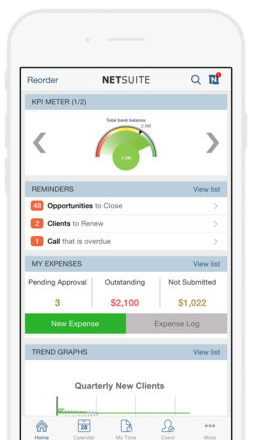
 The NetSuite app has a lot of great functionality to make work easier for your employees. One of the most popular time-savers is the ability to enter expense reports and maintain real time data on the go. Users who are on the road can end up pushing off expense reports for months or may wind up losing receipts before making it back to the office. This app allows them to enter expenses as they go and throw away the receipts when they’re done.
There are four simple steps to create an expense item in the mobile app:
- Tap on “New Expense” on the home dashboard.
- Tap the Camera Image Icon and choose and existing image on your phone or take a new photo. If you need to add multiple images for the expense, click on the camera icon again to add them. Please note that you can only upload up to 4 images.
- Enter the description fields (date, amount, currency, expense category, and a name).
- Click on Done to save the detail.
Users can see on the home dashboard expenses that are pending approval, outstanding to be paid, and expenses that they have not yet submitted, which allows users to quickly see the statuses of their reports on the fly.
Expense reports can cause a mess, but the NetSuite app makes them easier! See what else you can do on the app and with the rest of your NetSuite platform on our YouTube playlist or our other blog posts. If you would like more information about NetSuite, please please contact us at any time!
This publication contains general information only and Sikich is not, by means of this publication, rendering accounting, business, financial, investment, legal, tax, or any other professional advice or services. This publication is not a substitute for such professional advice or services, nor should you use it as a basis for any decision, action or omission that may affect you or your business. Before making any decision, taking any action or omitting an action that may affect you or your business, you should consult a qualified professional advisor. In addition, this publication may contain certain content generated by an artificial intelligence (AI) language model. You acknowledge that Sikich shall not be responsible for any loss sustained by you or any person who relies on this publication.