







Choosing the right Microsoft Dynamics 365 Customer Engagement (CE) module for your business can feel like standing in front of a buffet of amazing options—everything looks good, but what’s the perfect combination for your specific appetite? Today, I’m breaking down the three most popular CE modules: Sales, Customer Service, and Field Service to help you understand which one (or combination) might be right for your organization. Let’s dive into a general overview of why businesses might choose each platform, what they’re commonly used for, and the types of companies that benefit from them.
Dynamics 365 Sales: Building Revenue Engines
What It Does
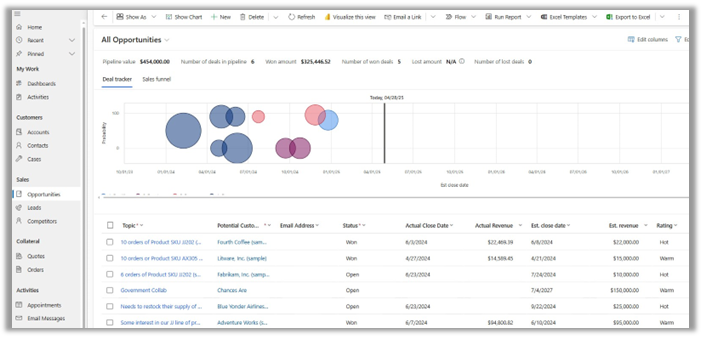
Dynamics 365 Sales is all about helping your sales team close more deals, faster. It provides a structured approach to managing your sales pipeline from a lead to close, with tools specifically designed to assist sellers in prioritizing their activities and engaging customers effectively. It provides insights into customer preferences and buying behaviors, enabling personalized and timely engagements that drive higher conversion rates.
Key Features
- Sales Accelerator: AI-powered work queues that prioritize leads and opportunities
- Predictive Scoring: ML models that identify which leads are most likely to convert
- Relationship Intelligence: Insights into customer relationships and communication patterns
- Sales Forecasting: Accurate revenue predictions based on pipeline data
- Guided Selling: Step-by-step processes to guide sellers through your sales methodology
Common Uses
- Lead Management: Track and nurture leads through the sales pipeline.
- Opportunity Management: Monitor and manage sales opportunities to close deals efficiently.
- Customer Insights: Gain valuable insights into customer behavior to tailor sales strategies.
Who It’s For
- B2B companies with longer, more complex sales cycles
- Retail: For managing large volumes of customer interactions and sales opportunities.
- Professional services firms managing client relationships and opportunities
- Manufacturing and distribution companies with direct sales forces
- Technology companies with solution-based selling approaches
ROI Drivers
- Increased win rates through better lead qualification
- Shortened sales cycles with guided selling processes
- Higher average deal values through cross-sell/upsell recommendations
- Improved forecast accuracy for better resource planning
- Greater sales productivity with automated routine tasks
Dynamics 365 Customer Service: Creating Loyalty Through Resolution
What It Does
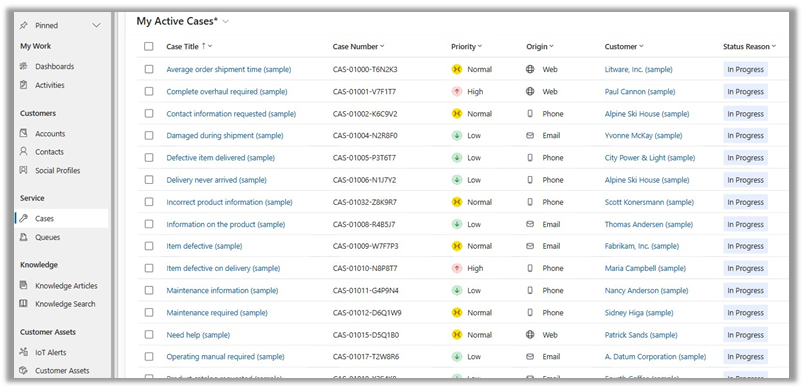
Dynamics 365 Customer Service transforms your customer support operations into relationship-building opportunities. It helps service teams deliver consistent, personalized support across channels while maximizing efficiency and customer satisfaction. It enables efficient case management, tracking, and knowledge base management, ensuring that customer inquiries are resolved promptly and consistently across multiple communication channels.
Key Features
- Knowledge Management: Centralized knowledge base for consistent answers
- AI-Powered Suggestions: Automatic recommendations for case resolution
- SLA Management: Tracking of service level agreements and escalation paths
- Customer Service Analytics: Comprehensive reporting on case metrics and agent performance
Common Uses
- Case Management: Track and resolve customer issues efficiently.
- Knowledge Base: Provide self-service options and quick access to information.
- Multi-Channel Support: Offer support through various channels like email, chat, and phone.
Who It’s For
- Subscription-based businesses with ongoing customer relationships
- Technology providers offering product support
- E-commerce: To handle high volumes of customer inquiries and support requests.
- Healthcare organizations coordinating patient inquiries
- Financial Services: To offer personalized support and resolve complex issues.
- Retail businesses with complex customer service needs
ROI Drivers
- Reduced cost per case through improved agent efficiency
- Increased first-contact resolution rates
- Higher customer satisfaction and retention rates
- Lower training costs with guided agent experiences
- Reduced escalations through improved knowledge sharing
Dynamics 365 Field Service: Delivering Excellence On-Site
What It Does
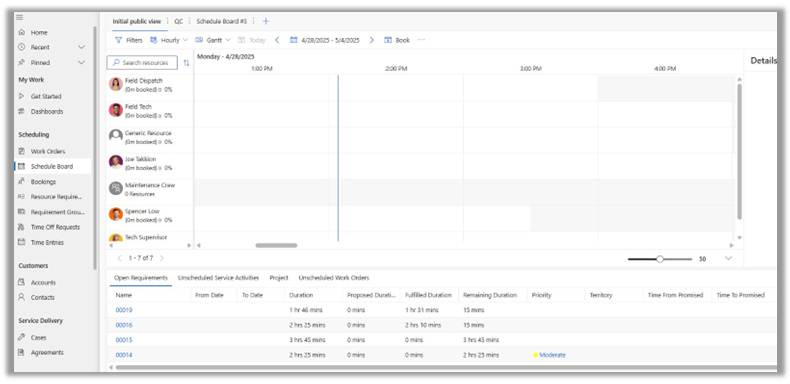
Dynamics 365 Field Service connects your office to your field technicians, optimizing scheduling, resource utilization, and on-site service delivery. It transforms reactive service into proactive solutions through IoT integration and mixed reality support. ideal for businesses that require on-site service management. It helps connect your workforce, products, and customers on one platform to deliver exceptional on-site service.
Key Features
- Resource Scheduling Optimization: AI-powered scheduling to maximize efficiency
- Mobile Technician App: Comprehensive mobile tools for field staff
- Inventory Management: Real-time tracking of parts and tools
- IoT Integration: Proactive maintenance through connected devices
- Mixed Reality (HoloLens): Remote assistance and guided repairs
- Customer Communications: Automated updates on technician arrival and service status
Common Uses
- Work Order Management: Schedule and dispatch technicians efficiently.
- Asset Tracking: Monitor and maintain equipment and assets in the field.
- Mobile Capabilities: Enable field technicians to access information and update statuses on the go.
Who It’s For
- Equipment maintenance providers managing preventive and break-fix services
- Utilities and telecommunications companies with distributed infrastructure
- Healthcare providers delivering in-home care
- Property management firms coordinating maintenance services
- HVAC: For managing installation and maintenance services.
- Oil & Gas: To track and maintain equipment in remote locations.
- Manufacturing companies providing installation and repair services
ROI Drivers
- Increased technician productivity through optimized scheduling
- Higher first-time fix rates with better preparation
- Reduced travel time and fuel costs
- Lower inventory costs through improved parts management
- Transition from break-fix to predictive maintenance models
How the Modules Work Together
While each module stands strong independently, the real magic happens when you combine them to create a seamless customer experience across the entire journey:
Sales + Customer Service
When a deal closes in Sales, all the relationship history and customer knowledge transfers seamlessly to Customer Service, ensuring consistent customer experiences post-sale.
Customer Service + Field Service
When a support case requires on-site assistance, it can be converted to a field service work order with all relevant case details, creating a smooth transition.
Field Service + Sales
Field technicians can identify new opportunities while on-site, creating sales leads that flow directly to the sales team for follow-up.
How to Choose the Right Dynamics 365 CE Module(s) for Your Business
Ask These Questions
- What’s your primary customer interaction model?
- Primarily selling products/services → Sales
- Primarily providing support → Customer Service
- Primarily delivering on-site services → Field Service
- What are your biggest operational pain points?
- Lengthy sales cycles or low conversion rates → Sales
- High case volumes or poor satisfaction scores → Customer Service
- Scheduling inefficiencies or low first-time fix rates → Field Service
- What’s your growth strategy?
- Acquiring new customers → Sales
- Retaining and expanding existing relationships → Customer Service
- Diversifying service offerings → Field Service
Common Implementation Scenarios
Scenario 1: The Complete Customer Experience
Companies with complex products/services often implement all three modules to manage the complete customer lifecycle from prospect to long-term client.
Scenario 2: The Service Organization
Service-focused businesses typically start with Customer Service and Field Service integration to streamline their core operations.
Scenario 3: The Sales-Led Organization
Growth-focused companies usually begin with Sales, then add Customer Service as they build their customer base and support needs increase.
Wrapping Up
Choosing the right Dynamics 365 CE module(s) comes down to understanding your customer journey and identifying where technology can make the biggest impact on your business operations. Whether you’re focused on winning new business, delivering exceptional service, or optimizing your field operations, D365 offers a tailored solution to meet your needs.
Remember that you don’t have to implement everything at once—a phased approach focusing on your most pressing business challenges often yields the best results. Start where you’ll see the most immediate impact, then expand as your team becomes comfortable with the platform. And although we discussed three major platforms, Microsoft has many more—FSCM, Project Operations, Customer Insights, etc.
Ready to choose the right Dynamics 365 CE module for your business? Please reach out to our experts at any time!
This publication contains general information only and Sikich is not, by means of this publication, rendering accounting, business, financial, investment, legal, tax, or any other professional advice or services. This publication is not a substitute for such professional advice or services, nor should you use it as a basis for any decision, action or omission that may affect you or your business. Before making any decision, taking any action or omitting an action that may affect you or your business, you should consult a qualified professional advisor. In addition, this publication may contain certain content generated by an artificial intelligence (AI) language model. You acknowledge that Sikich shall not be responsible for any loss sustained by you or any person who relies on this publication.