





Three years ago I wrote a blog about how to find which port a device is plugged into on a Cisco switch if you knew the IP address of the device. In that blog is a command I’ve been using for decades: show cdp neighbors. It is almost always abbreviated to one of these:
- show cdp nei
- sho cdp nei
- sh cd nei
- sh cd n
Choose any variation of the abbreviations, they all work.
I’ve taken this command for granted through the years and only ever used it in that manner. I’ve been missing out on the additional syntax availability of “detail.”
How to Use the Show cdp neighbors detail Command
Here’s a Cisco switch environment that’s fairly typical after running the normal command. Of course you see the devices that are reporting CDP information to this switch like other Cisco switches, access points, etc. You are shown:
- the local interface that the device is plugged into
- the name of the device in the Device ID column
- the type of device plugged in is shown in the Platform column
- the interface on the attached device that is plugged into this switch in the Port ID column
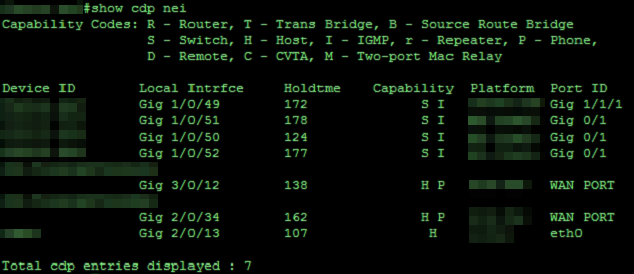
However, let’s say I wanted to know more information about the device that is in Gi/1/0/51. For it type: show cdp nei gi/1/0/51 detail.
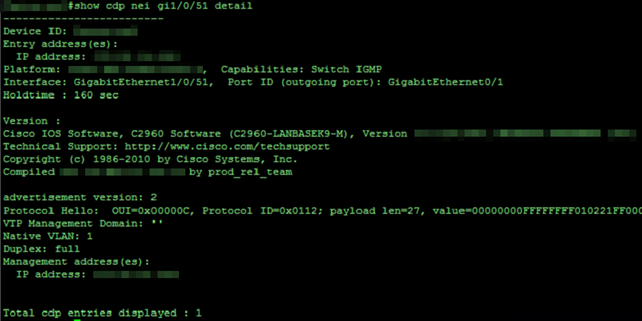
From here we have the switch name, its IP address for management, and the full type of switch. There is even the native vlan and code version of what it is running.
Why use the Show cdp neighbors detail Command?
In my last blog I stated that there was a need to know a little bit of the environment, and alluded to the network admin needing to know information about the switching infrastructure. Meaning, they would need to know the IP address of the switches inline. However, with this additional detail ability on the switch, it makes it that much easier to hunt down.
For this command, it isn’t necessary to specify the port you want more detail on. You can type simply show cdp nei detail to show all details for neighbors. It is a lot of information and might be useful when grabbing a copy of the config.
When grabbing information from a switch for backup configuration, I usually include a show cdp neighbors statement to grab the neighboring devices. I’ll likely update that going forward to have both the show cdp neighbors and show cdp neighbors detail commands when saving the configuration.
Have any questions about using the show cdp neighbors detail command to learn more information about devices plugged into a Cisco switch? Please feel free to reach out at any time!
This publication contains general information only and Sikich is not, by means of this publication, rendering accounting, business, financial, investment, legal, tax, or any other professional advice or services. This publication is not a substitute for such professional advice or services, nor should you use it as a basis for any decision, action or omission that may affect you or your business. Before making any decision, taking any action or omitting an action that may affect you or your business, you should consult a qualified professional advisor. In addition, this publication may contain certain content generated by an artificial intelligence (AI) language model. You acknowledge that Sikich shall not be responsible for any loss sustained by you or any person who relies on this publication.