







Design engineering requires strict change control. The design of anything, from the simplest piece of metal to a major assembly with many mechanical and electronical components, has to be strictly controlled. Soon the design will be manufactured on the shop floor and after that, in the case of Industrial Equipment, it will spend many years operating at a customer site.
There is never a moment that design changes can be made informally. Design changes have to be formal and have to go through approvals. The mechanism for this is the Engineering Change Order, optionally preceded by an Engineering Change Request. This is standard functionality in any PDM/PLM system and is assumed to be in place. In the solution sketched below, Microsoft Dynamics 365 for Finance and Operations (D365FO) follows the design changes in PDM/PLM.
Whether the manufacturing company actually does the manufacturing of its own designs or mostly outsources it to contract manufacturers, is not essential.
The Sikich manufacturing customers mostly manufacture their own designs. Many of the Sikich manufacturing customers are primarily or mostly Engineer-to-Order businesses, which means that every sales order will trigger engineering design activities.
Every design will go through changes, and this does not stop when we have started purchasing and manufacturing the item.
D365FO will have to know about those engineering revisions. Most engineering organizations work with major and minor revisions. The minor revisions are something internal to engineering and these revisions are not of interest to Manufacturing or Purchasing. But a major revision needs to be known in the ERP system because it can affect Purchasing or Manufacturing. The Sikich approach to engineering revision traceability in D365FO tries to find the middle ground between revision functionality that is too strong (i.e., the revision is a product dimension, making the revision behave like a separate item in planning and in inventory management) and revision functionality that is too weak (i.e. only information on the side without any consequences in transactions).

This approach translates into the following behavior of the Sikich application for engineering Revision Control in D365FO:
- The major revision of any design is visible and is traceable in D365FO. An interface will make sure the latest major revision is always visible in D365FO.
- Engineering revisions are visible on the Released product, the BOM lines, and on the major transactions.
- Engineering revisions are not relevant in Master Planning because manufacturing companies will plan to buy and make the current revision, which is almost always the latest revision of a part number. In planned orders, there is no visibility of the engineering revision. At firming, the current engineering revision, already visible on the Released product, is added to the transaction.
- Engineering revisions play no role in costing. The item is still the same item after being revised. The item revision has changed (and we hope improved) either its fit or its form or its function. If the cost would become significantly different, a new part number is necessary.
- Engineering revisions play no role in the inventory on-hand balance. It is assumed that the quantity we have on-hand is the latest revision. If that would not be the case, rework or scrap would make sure that what we have on-hand is the latest revision. This latest revision will fit and will be backward compatible with older installations at customers. If this is not the case, a new part number is needed.
- Engineering revisions play no role in the Sales transactions when it is about parts or spare parts. We are selling the latest revision to our customers because that is what we buy or make and that is what we have in inventory. When we sell parts, we do need to know the BOM revision in our “As built” information, but there is no need to have a revision field on the sales orders.
- Engineering revisions need to be shown on Purchase orders and Production orders. We have to make sure that buyers and production supervisors know which revision they are dealing with.
- When an item is revised between the time the transaction was created and the moment we start actually working on it, the Sikich code will send a warning to the user. Then the latest drawing has to be retrieved and the changes have to be analyzed before we can proceed with purchasing or manufacturing.
- The user will have to give feedback, on the transaction, after having checked the new revision and concluded what should be done.
- When MRP is not involved, older revisions can be manufactured or purchased in isolated cases where this is necessary. Manual purchase or production orders will be created for this older revision.
- In contrast with the standard ECM module (Engineering change management) the product revision is not a dimension but is a new field that does not transact but only provides information. This provides the “middleman” behavior of the Revision that our customers need.
Display of the Engineering Revision in D365FO

The revision is a new field on the Released product that is updated by an interface with any PDM/PLM system.

On the BOM lines, the current revision of each component is showing.
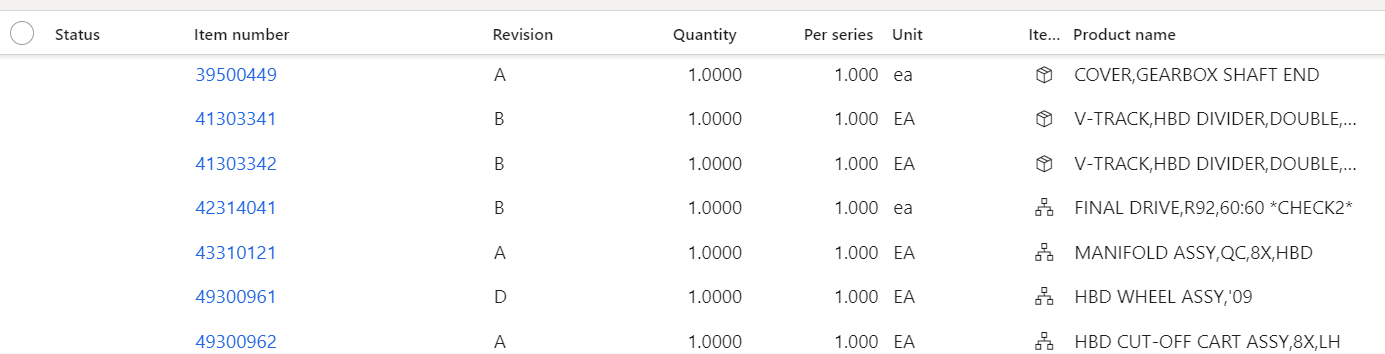
On the Production order, BOM lines the same is the case.
Warning Message When Revision is Out of Date on a Production Order
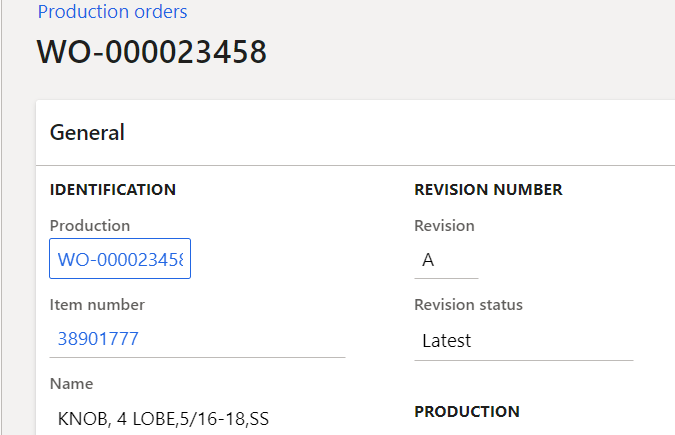
On the Production order, Sikich added logic to check on the revision of the parent item. The revision of the parent item is displayed with its status, in the General section. When this status is “Latest,” the production order will go through its further process without a warning. (NOTE: there is no check on the revision of all the Prod-BOM components)
If during the existence of this Production order the revision of the parent item would change, the Production order would show the following:
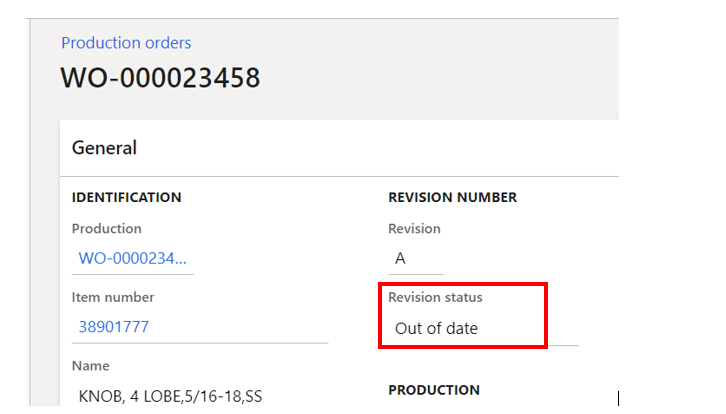
The Production order Revision status now says “Out of date.” This Revision status change happens instantly, as soon as the revision on the Released product changes.
When releasing or starting this Production order, a warning will appear.

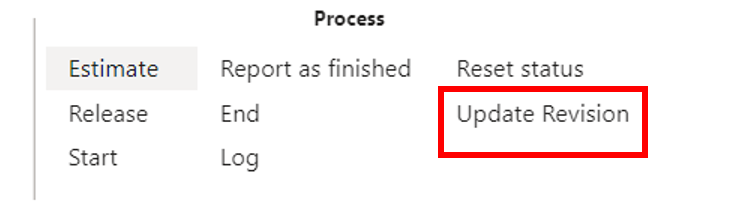
In the action area is a new menu choice “Revision update.”
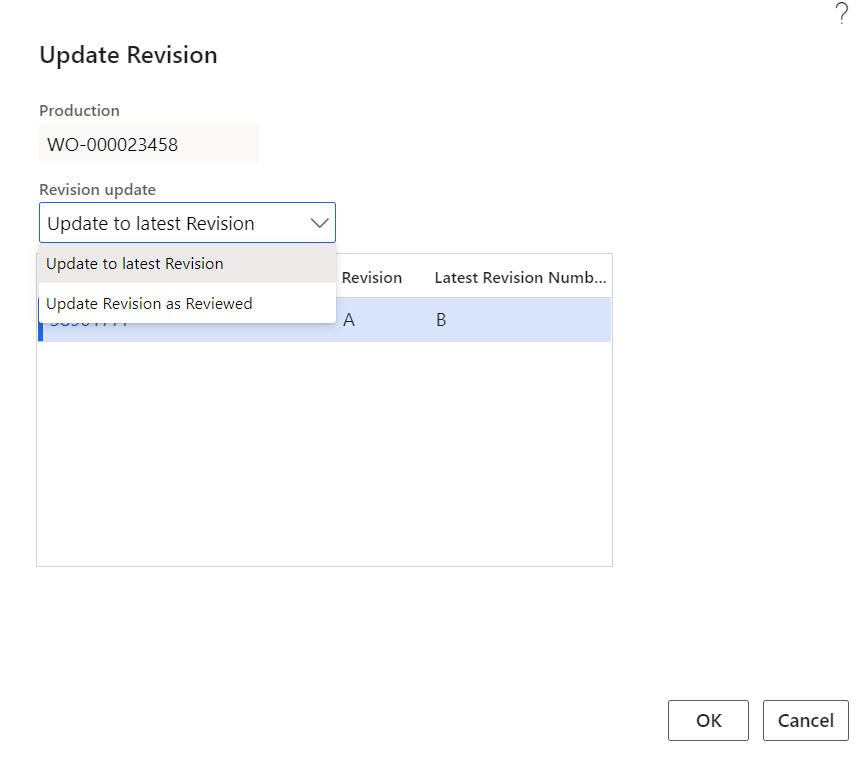
The user has to either update the revision on the Production order after having compared the new drawing revision and taken necessary action. Or simply “review” it. In both cases, the Production order is no longer stopped and can be processed further.
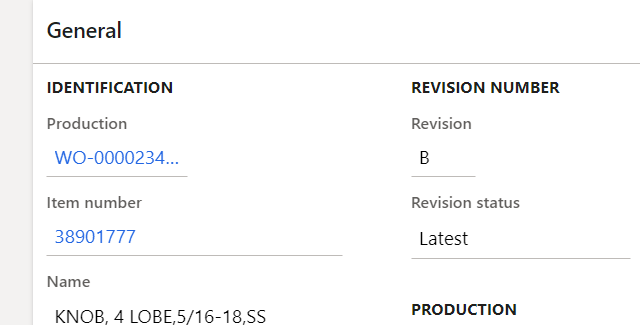
After approval, the Production order shows “Latest” revision status again.
Warning Message When Revision is Out of Date on a Purchase Order Line

On the Purchase order lines, we see the item Revision and its Revision status.

During the existence of this Purchase order, a new Engineering revision was released. At this moment, the revision on the Released product is no longer “A.” The Purchase order line is instantly updated after the Item revision changes.

During confirmation of the Purchase order (when it will be sent to the vendor), the user will see the warning shown above.

Just like in the Production order, a new menu choice is available on the Purchase order line, “Revision update.”
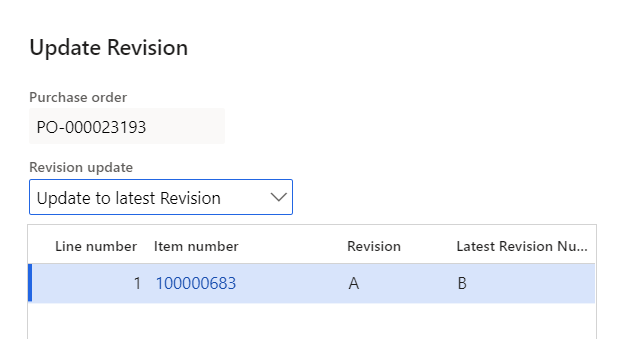
The buyer has the choice to either update the Revision on the Purchase order or “review” it. The system assumes that the buyer has attached the latest drawing before doing this.
After this, the Purchase order is ready to be confirmed to the vendor.
Summary
The Sikich enhancement for engineering Revision control in D365FO is a simple but very effective way to make sure the operational side of the business is purchasing and manufacturing the latest revision.
The Revision field is a new field that has no connection to product dimensions or any inventory dimension functionality.
The Revision field is informational. The revision is not actually part of the transaction, but logic has been added to stop Production orders and Purchase orders where the revision on the transaction is not the same as the current revision on the Released product.
Combined with a standard PDM/PLM interface with any PDM/PLM system, we have a solid solution that satisfies the requirement of most manufacturing companies.
This publication contains general information only and Sikich is not, by means of this publication, rendering accounting, business, financial, investment, legal, tax, or any other professional advice or services. This publication is not a substitute for such professional advice or services, nor should you use it as a basis for any decision, action or omission that may affect you or your business. Before making any decision, taking any action or omitting an action that may affect you or your business, you should consult a qualified professional advisor. In addition, this publication may contain certain content generated by an artificial intelligence (AI) language model. You acknowledge that Sikich shall not be responsible for any loss sustained by you or any person who relies on this publication.