







Software Version Used
- Installed product version: 10.0.11 (10.0.464.20020)
- Installed platform version: Update 35 (7.0.5644.41461)
Introduction
The royalty functionality in Dynamics 365 for Finance and Operations (D365FO) allows for calculating, accruing, and invoicing of automatically created royalty claims. Royalty claims are created when sales order invoices are posted for item numbers that have been included on one or more royalty contracts/royalty codes. This allows for some automation to be introduced into your royalty processes when maintained in D365FO.
Setup and Configuration
One of the features of the royalty functionality is the ability to group sales together in different sized buckets when determining the appropriate tier for royalty amounts calculations. In this example, sales transactions should be grouped into weekly buckets, and then the sales quantity should be used to determine the appropriate royalty amounts tier.
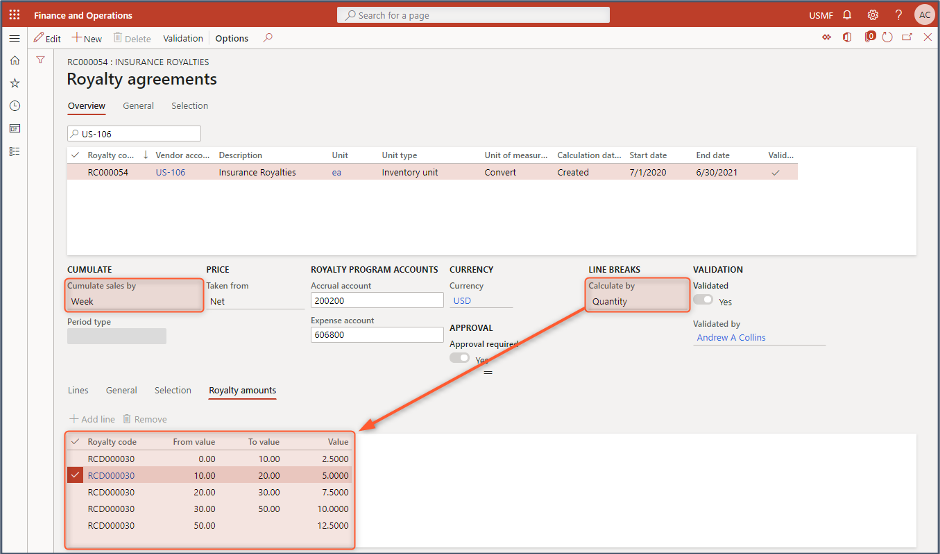
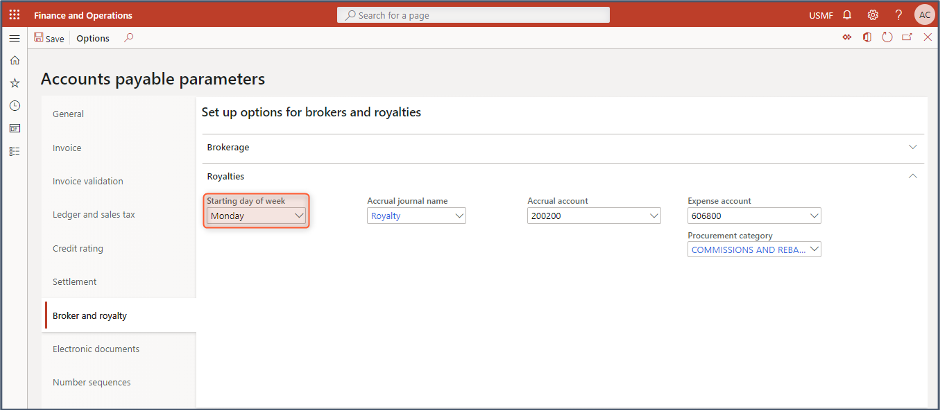
When “Week” is selected as how sales will be cumulated, there is an additional Accounts payable parameter configuration to consider. The configuration set for the “Starting day of week” parameter field highlighted in the screenshot below will control how the weekly buckets are determined. When “Monday” is selected, the weekly buckets will span from Monday to the following Sunday, at which point a new weekly bucket will be created.
Cumulated Transactions
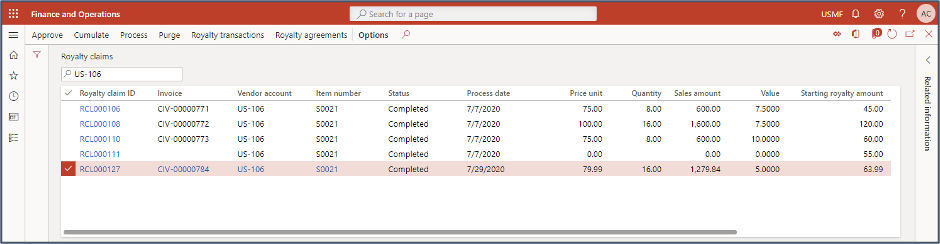
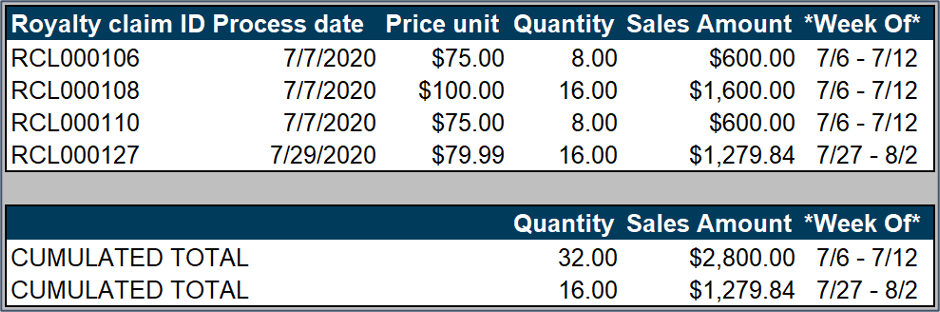
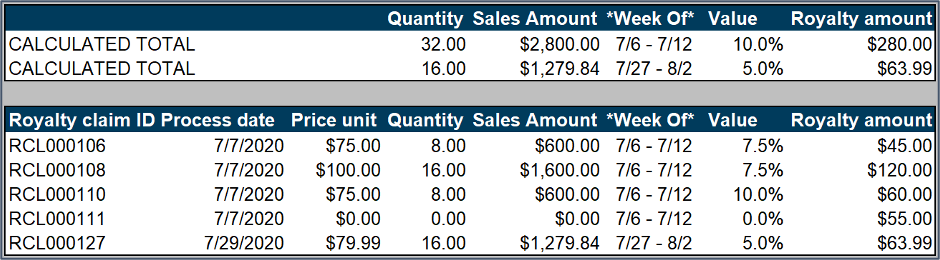
For this example, we will look back on the royalty claims that have been created from four source sales order invoices. Three of these transactions were dated 7/7 and one was dated 7/29. As we will see, the three transactions were grouped together since they fall within one week and the fourth transaction was calculated separately.
There is an additional royalty claim that was created without an associated sales order invoice. The reason for this is explained in detail in our Calculating and Recalculating Royalty Amounts blog.
Cumulating Royalties Logic in D365FO
The first thing that is done during the cumulation process is to identify how transactions within a royalty agreement are to be cumulated. In this case, that is weekly, and the first day of the week should be Monday. The royalty claims are then grouped together in the correct weeks and cumulated appropriately.
Once the royalty claims have been grouped and cumulated, then the royalty tiers can be identified, and finally the royalty amounts calculated. Any adjustments or corrections that are needed may result in additional royalty claims to be created to ensure the final invoiced royalty amount is correct. Again, this can be seen in more detail in our Calculating and Recalculating Royalty Amounts blog.
Conclusion
The cumulate sales by functionality on royalty agreements allows for royalty rates to be determined based on sales volumes over certain periods. This can be a good way to ensure that high performing months get the appropriate royalty while lower performing months do not get overstated.
Have any questions about calculating cumulating royalties in D365FO? Please reach out to our team at any time!
This publication contains general information only and Sikich is not, by means of this publication, rendering accounting, business, financial, investment, legal, tax, or any other professional advice or services. This publication is not a substitute for such professional advice or services, nor should you use it as a basis for any decision, action or omission that may affect you or your business. Before making any decision, taking any action or omitting an action that may affect you or your business, you should consult a qualified professional advisor. In addition, this publication may contain certain content generated by an artificial intelligence (AI) language model. You acknowledge that Sikich shall not be responsible for any loss sustained by you or any person who relies on this publication.