







NetSuite is a great financial solution to help your business’ daily activities, but it is also a great CRM solution! Many NetSuite users don’t use the CRM aspect to its full potential which could be hurting their productivity. Manage your sales team within NetSuite more effectively by using these three easy steps detailed below: engage your team, expedite customer acceptance/renewal, and evaluate performance in real-time.
Step 1: Engage Your Team
One way to increase engagement from sales reps is to require that all sales activity emails, phone calls, and tasks are performed from inside NetSuite. That way, there is one source for better sales activity tracking and reporting. Two benefits of doing this are:
- Sales management can determine the average number of “touches” it takes to close an opportunity; and
- Analyzing activities can produce the average time to close a sale, which can assist leaders and reps with managing the pipeline.
Entering all activities in NetSuite also allows companies to take advantage of a built-in SuiteApp called Last Sales Activity (LSA), which uses scheduled mass updates to automatically track the last known activity on each contact, customer, and opportunity. A reference field is added to each Customer, Contact, and Opportunity record that includes the date and link to the last sales activity for the record.
LSA comes with several built-in saved searches such as “Opportunities without sales activities in the last week,” which help to focus your pipeline efforts. Additionally, Sikich consultants often build Custom Workflows to automate response events to help sales reps manage their pipeline, such as auto-generating a follow-up task 7 days before a quote is due to expire.
Step 2: Expedite Customer Acceptance/Renewal
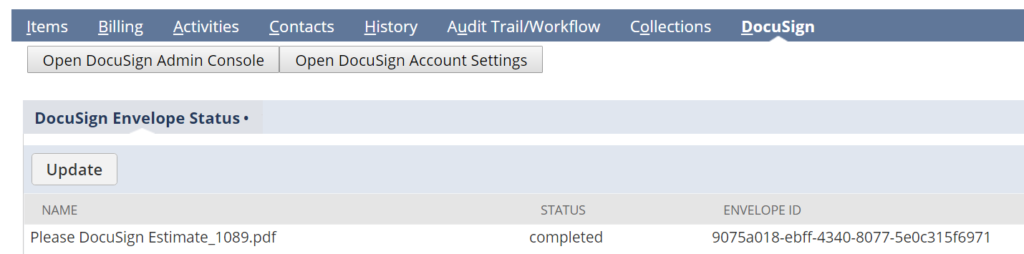
Sikich assists customers in closing opportunities faster by implementing electronic signature SuiteApps. One such app is DocuSign, which allows users to send a quote from within NetSuite with signature fields to accept quote terms and pricing on individual sales or longer term contracts.
With the DocuSign app, users can see the status of the signature envelope that has been sent to know if their customers have viewed a document or signed it from inside the Quote record in NetSuite.
Step 3: Evaluate Performance in Real-time
We help clients select a set of Key Performance Indicators from NetSuite’s standard list or we develop saved searches to use as custom KPIs.
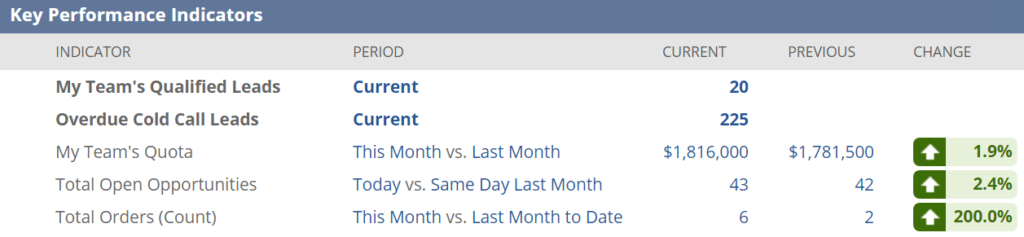
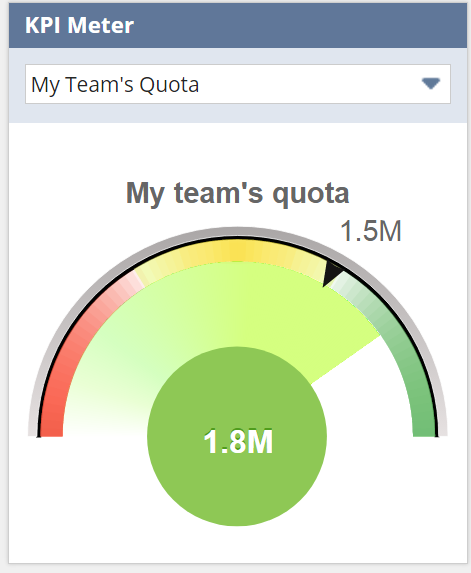
From this set of key performance indicators, it’s easy to create two additional dashboard visual tools: KPI Meters and KPI Scorecards. Set up KPI Meters on sales dashboards to keep sales teams aware of performance metrics against defined quotas.
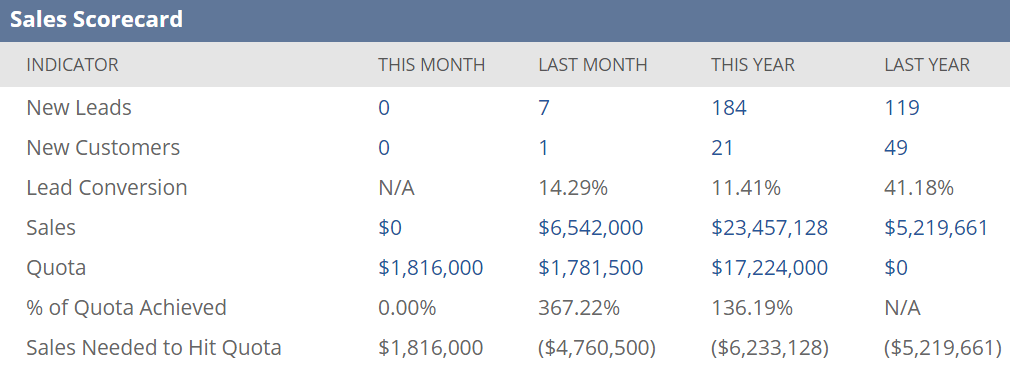
 Sales Managers should utilize the KPI Scorecard functionality within NetSuite which easily shows real-time results like year over year comparisons.
The Advanced Intercompany Journal Entries is just one of the many additions NetSuite has made with the 2017.1 release, so be sure to check out our blog for more! If you would like more information about the Advanced Intercompany Journal Entries or about OneWorld, please contact us today! You can also learn about more great tips for NetSuite on our YouTube playlist or our other blog posts.
This publication contains general information only and Sikich is not, by means of this publication, rendering accounting, business, financial, investment, legal, tax, or any other professional advice or services. This publication is not a substitute for such professional advice or services, nor should you use it as a basis for any decision, action or omission that may affect you or your business. Before making any decision, taking any action or omitting an action that may affect you or your business, you should consult a qualified professional advisor. In addition, this publication may contain certain content generated by an artificial intelligence (AI) language model. You acknowledge that Sikich shall not be responsible for any loss sustained by you or any person who relies on this publication.