







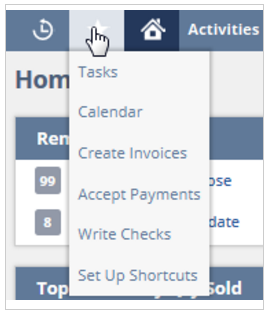
 When working in NetSuite, it is usual to be searching from page to page during your day, and I bet there are some specific pages that you go to every day. What if I told you there is an easy way to navigate to those specific pages and make your day more productive and it’s been right under your nose the whole time? The answer is NetSuite shortcuts.
Shortcuts can be found at the top left-hand side of your screen next to the home button and is in the shape of a star. The shortcuts button is where you can easily navigate and gain access to records, transactions, lists, searches, or reports that you use frequently and/or may have trouble navigating to.
Add a Shortcut
- Navigate to the page for which you wish to create a shortcut.
- Hover over the shortcut star and click Add to Shortcuts.
- A dialog box will appear so you can make changes before saving your shortcut. A name will automatically generate the page, but you can change it to what you feel more comfortable with. Also note that if you wish to have your pages open in a new tab every time, click the Open in New Window check box.
- Once you are finished in the dialog box, click Save.
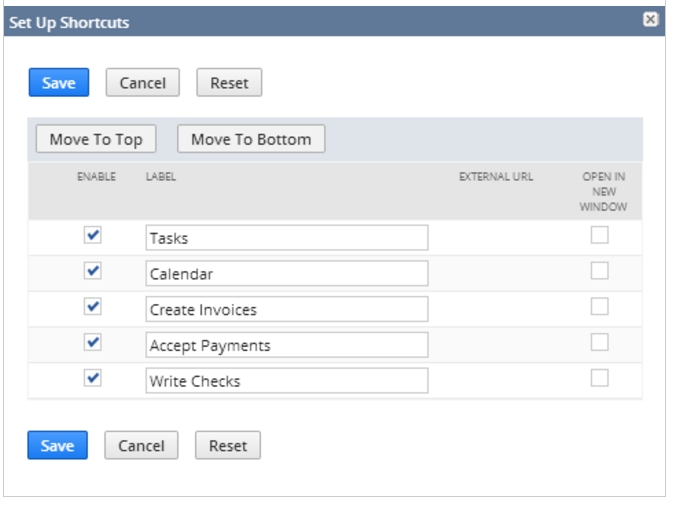
If you ever want to make a change to your shortcut list because you don’t use a page anymore or you feel you have too many there, start by hovering your mouse over the shortcut star icon. Then, click Set Up Shortcuts. On this page, you can edit your shortcut names, change the order of your shortcuts and check/uncheck the Open in New Window check box for any of your shortcuts.
If you would like more information about adding shortcuts or other NetSuite tips, please feel free to contact us. You can also learn about more great tips for NetSuite on our YouTube playlist or our other blog posts.
This publication contains general information only and Sikich is not, by means of this publication, rendering accounting, business, financial, investment, legal, tax, or any other professional advice or services. This publication is not a substitute for such professional advice or services, nor should you use it as a basis for any decision, action or omission that may affect you or your business. Before making any decision, taking any action or omitting an action that may affect you or your business, you should consult a qualified professional advisor. In addition, this publication may contain certain content generated by an artificial intelligence (AI) language model. You acknowledge that Sikich shall not be responsible for any loss sustained by you or any person who relies on this publication.