







Security within the Cloud needs to be taken seriously. In fact now, more than ever, hackers are finding and exploiting information from organizations large and small from all over the globe daily. Therefore, we need to take a more aggressive approach to security so we can react in real-time against a malicious actor or threat to your environment.
Utilizing the latest Office 365 Secure Score from Microsoft, our partner in security, is a great way to gain a broader understanding of your security posture and can provide guidance for improving your position within your entire Office 365 infrastructure. If your Windows 10 devices are enrolled in Microsoft InTune for MDM (mobile device management) or MAM (mobile app management), these security benefits can extend to them as well. Microsoft Secure Score also lets you compare your score with other companies that are in the same industry as you!
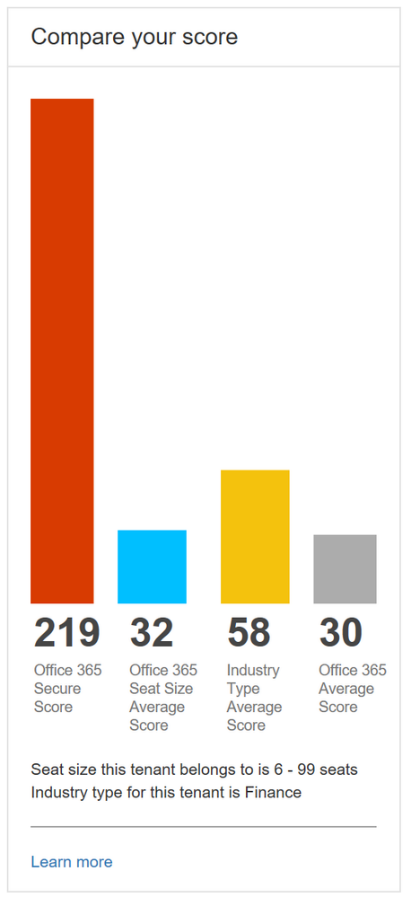
The Secure Score can offer good advice on changes you can make to your Office 365 or Azure tenant to improve security. These can be something simple, such as:
- Adding multi-factor authentication (MFA) to your Global Admin accounts
- Setting up end users for MFA
- Blocking client email forwarding rules to keep data from leaking
- Auditing for inactive accounts
- Alerting for new Global Admin accounts
- Disabling guest/anonymous sharing of data
- Other security-based changes to improve your organization’s line of defense
These features are not enabled by default on any Office 365 tenant, but can and should be enabled to secure your data.
Additional features can be configured for more advanced protection and to include workstations running Windows 10 and InTune. Some examples:
- Data Loss Prevention (DLP) policies via InTune to keep data from being shared, printed, screenshot and more, including some highly specific configurations
- Automatic file encryption and permissions for data that has specific properties (e.g., credit card data, Social Security data, compliance data such as PCI or HIPAA)
- Automatic endpoint encryption with keys saved to Azure AD
- Windows Defender with Advanced Threat Protection (ATP) for anti-virus and endpoint reporting
- Cloud App Security to control policies on applications both locally and cloud enabled
Contact the Sikich Tech Team to learn more about how we can build a partnership together to strengthen and empower your business and employees by utilizing and sharing the latest technology, both effectively and securely.
This publication contains general information only and Sikich is not, by means of this publication, rendering accounting, business, financial, investment, legal, tax, or any other professional advice or services. This publication is not a substitute for such professional advice or services, nor should you use it as a basis for any decision, action or omission that may affect you or your business. Before making any decision, taking any action or omitting an action that may affect you or your business, you should consult a qualified professional advisor. In addition, this publication may contain certain content generated by an artificial intelligence (AI) language model. You acknowledge that Sikich shall not be responsible for any loss sustained by you or any person who relies on this publication.