







In this article, we will review where and how to configure shipment consolidation polices, useful tips, and close with a sample policy overview for warehouse management. First things first, let’s define shipment and what that means in Microsoft Dynamics 365 Finance and Operations (“D365FO”).
When a sales order is released to the warehouse, a shipment and shipment lines are created. A shipment is a delivery to a single address that has the same mode of delivery. The shipment lines of multiple Sales orders for the same delivery address and mode of delivery could be on the same Shipment.
Where do I configure SCP?
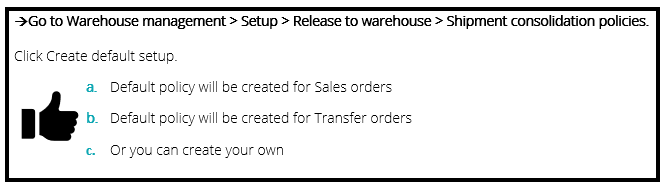
Sales orders can be released to the warehouse in various ways, but for the purposes of this article, we will focus on the instances related to shipment consolidation.
The shipment consolidation policies (SCP) can be used from the following places in D365FO:
- Manual consolidation from the shipment workbench
- Separate release to warehouse form
- Release to warehouse function from the Load planning workbench
- Release to warehouse function from the sales or transfer order
- Automated release to warehouse batch job
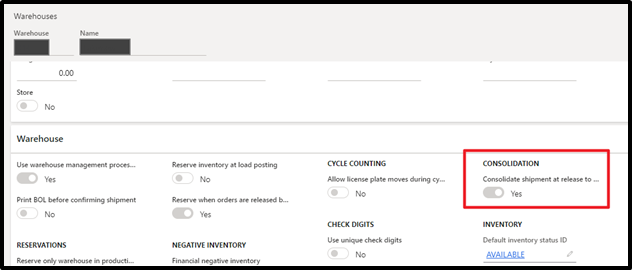
Prior to the introduction of this flighted functionality, the consolidate shipments at release to warehouse was a global setting applied to each warehouse (Figure 1). Introducing this new SCP allows flexibility in D365FO to account for scenarios where customers have varying, or more complex requirements for shipment consolidation.
Pro tip: The “Consolidate Shipment at Release to Warehouse” setting that was previously available on the Warehouses setup page will be hidden when a shipment consolidation policy is activated.
How can this be useful, you may ask?
I will offer three scenarios:
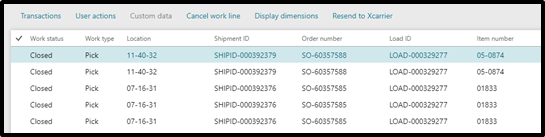
- You have a customer who has a weird way of placing their orders. Take a glance at the sales orders below. Why would a customer send me a sales order for 2 or 3 lines with the same quantity, for the same item, being delivered to the same address? Why not send me one sales order line that has the total quantity of the item to be shipped? Believe me it happens, and Shipment consolidation would be ideal for this scenario. If you notice, I applied a SCP to these orders. If you focus on the shipment IDs, you can see the result.
- What if you have a customer that place sales orders randomly throughout the day and they want all of them to go on a truck at the end of the day? SCP would be perfect for this.
- How about if you have an item that gets careful handling and shipping concerns? SCP would work great because you could create and apply a shipment consolidation policy only for that item number in D365FO.
How to flight the feature
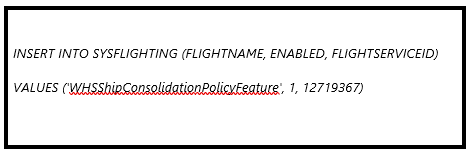
At the time this article was written, the SCP feature was not available in general release. In order to enable WHSShipConsolidationPolicyFeature, you have to enter the Below SQL code:
Sample sales order policy
Consolidate with open shipments option has been added to each policy. When this option is turned on, the Release to warehouse procedure finds shipments for consolidation by searching among existing shipments that were created based on the same consolidation policy.
Every shipment consolidation policy has a query and a choice of fields to use in the policy. Shown below is a sample policy for sales orders using the Account number, delivery recipient, postal address and warehouse. These are mandatory fields. All fields are found in the WHSShipment table, of course.
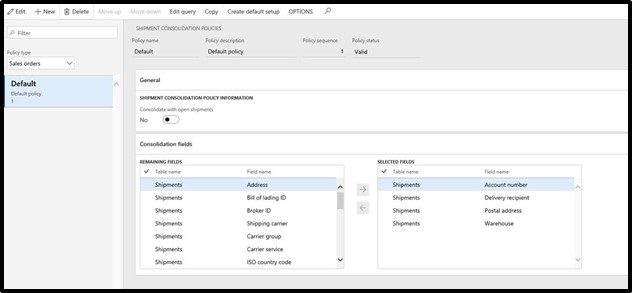
Other useful fields that can be include as a part of the Shipment consolidation policy:
|
|
I hope this Shipment Consolidation for warehouse management feature can help alleviate which can be a very tedious process of grouping and releasing sales orders to the warehouse in D365FO. SCP is a useful and flexible feature that you should examine for your organization to assist in the process.
This publication contains general information only and Sikich is not, by means of this publication, rendering accounting, business, financial, investment, legal, tax, or any other professional advice or services. This publication is not a substitute for such professional advice or services, nor should you use it as a basis for any decision, action or omission that may affect you or your business. Before making any decision, taking any action or omitting an action that may affect you or your business, you should consult a qualified professional advisor. In addition, this publication may contain certain content generated by an artificial intelligence (AI) language model. You acknowledge that Sikich shall not be responsible for any loss sustained by you or any person who relies on this publication.