







In network management, sometimes the smallest visual cues can lead to the discovery of significant problems. Recently, after a customer reported vague concerns about network speeds, I found myself investigating their Meraki wireless infrastructure. The customer couldn’t point to anything specific, just that things seemed “a bit problematic” and slower than usual. During this investigation, I noticed a subtle difference in the network status icons displayed for various Access Points (APs).
The tale of two icons
While reviewing their Meraki dashboard in response to the customer’s concerns, I observed that the APs were displaying two different status icons:
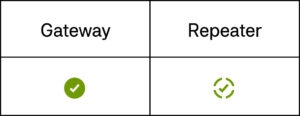
The APs with the solid green checkmark icon worked fine, while those with the repeater circular arrows icon were mysteriously no longer getting an IP address. At first glance, this might seem like a minor discrepancy, but to anyone familiar with network infrastructure, this visual difference signals two entirely different operating states. The APs showing the repeater icon were not receiving proper IP addresses, a clear indicator of an underlying network issue.
Diving deeper: from symptom to cause
When an AP operates in repeater mode, it essentially means it’s not connecting directly to the wired network but is instead wirelessly extending another AP’s signal. In the customer’s environment, this wasn’t the intended configuration. All the APs were supposed to be directly connected to the network via Ethernet, each with its own IP address.
Further investigation revealed the affected APs were unable to obtain IP addresses through DHCP. This prompted me to examine the network configuration more closely, particularly the VLAN settings responsible for AP management.
After methodically working through the network configuration, I discovered the root cause: a VLAN had been inadvertently dropped from the network configuration. An older switch had lost its configuration after a power cycle and needed the configuration restored (and eventually the switch replaced). This missing VLAN was precisely the one designated for AP management in certain areas of the facility.
The impact of a missing VLAN
The consequences of this configuration error extended beyond just a few APs operating in repeater mode:
- Reduced Performance: APs in repeater mode deliver significantly lower performance compared to those directly connected to the wired network
- Increased Latency: The wireless backhaul created an additional hop in the network path
- Coverage Inconsistency: The affected areas experienced diminished signal quality and reliability
- Management Limitations: It’s possible that some advanced features weren’t available on the APs in repeater mode
Resolution and lessons learned
Restoring the missing VLAN configuration immediately resolved the issue. Within minutes of implementing the fix, the affected APs obtained proper IP addresses and returned to normal operation, as indicated by the solid green checkmark appearing in the dashboard.
This experience reinforced several important network management principles:
- Dashboard Indicators Matter: Even small visual cues in management interfaces can signal significant issues
- Understand Normal Behavior: Knowing what “normal” looks like makes it easier to spot anomalies
- Configuration Changes Require Verification: Any network change should be followed by comprehensive verification
- VLAN Management is Critical: VLANs are foundational to network segmentation and require careful administration
Conclusion
What began as an investigation into a customer’s vague speed concerns led to the discovery and resolution of a potentially serious network issue. The repeater icons in the Meraki dashboard served as the first clue that something was amiss, highlighting the importance of being observant and understanding the meaning behind status indicators.
For network administrators, this serves as a reminder that thorough familiarity with management interfaces and their visual indicators can make the difference between a smoothly operating network and one with hidden problems waiting to cause disruptions. Sometimes, the path to effective network troubleshooting begins with noticing a simple icon that doesn’t quite look right.
This publication contains general information only and Sikich is not, by means of this publication, rendering accounting, business, financial, investment, legal, tax, or any other professional advice or services. This publication is not a substitute for such professional advice or services, nor should you use it as a basis for any decision, action or omission that may affect you or your business. Before making any decision, taking any action or omitting an action that may affect you or your business, you should consult a qualified professional advisor. In addition, this publication may contain certain content generated by an artificial intelligence (AI) language model. You acknowledge that Sikich shall not be responsible for any loss sustained by you or any person who relies on this publication.