







Microsoft has released a new feature for Teams Voice that allows an administrator to route unassigned numbers. Administrators can create and manage rules to specify how to route unassigned phone numbers. Calls to unassigned numbers are matched against routing rules using match patterns in the evaluation order you specify. When a match is found, the call will be routed based on the matched rule. This is great for misdials or when someone departs the firm. Their calls can be sent to someone else, such as reception. There is no maintenance required either. Once a number is unassigned, it can be picked up by these rules.
For example, you might want to route calls to unassigned numbers as follows:
- Route all calls to a given unassigned number to a custom announcement.
- Route all calls to a given unassigned number to the main switchboard.
You can route calls to unassigned numbers to a user, to a resource account associated with an Auto Attendant or a Call Queue, or to an announcement service that will play a custom audio file to the caller.
You can configure routing of unassigned numbers by using the Teams admin center or by using PowerShell.
How to Configure Routing Unassigned Numbers in Teams Admin Center
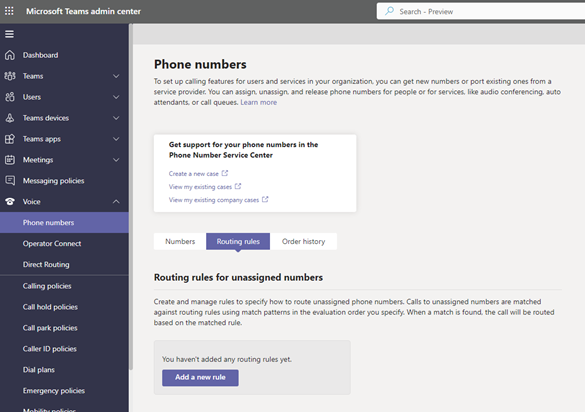
In the left navigation of the Microsoft Teams admin center, go to Voice > Phone Numbers.
On the Routing rules tab, click “Add a new rule.”
Give the rule a name, a description, and the evaluation order for the rule.
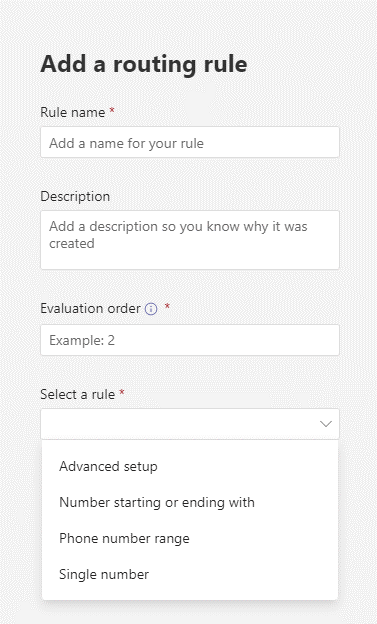
Decide which kind of rule you want to add. You can select rules where the type of phone number pattern is preconfigured, and you complete the pattern and the routing option. You can also select advanced setup, where you directly enter the regular expression for the phone number pattern and the routing option. Select Save.
You can also create a routing rule directly for an unassigned phone number.
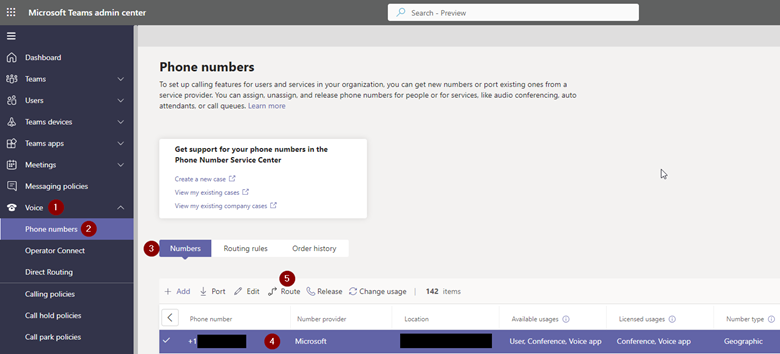
In the left navigation of the Microsoft Teams admin center, go to Voice > Phone Numbers.
On the Numbers tab, select an unassigned phone number and click Route at the top of the view.
Give the rule a name, a description, and the evaluation order for the rule.
Select the routing option. Select Save.
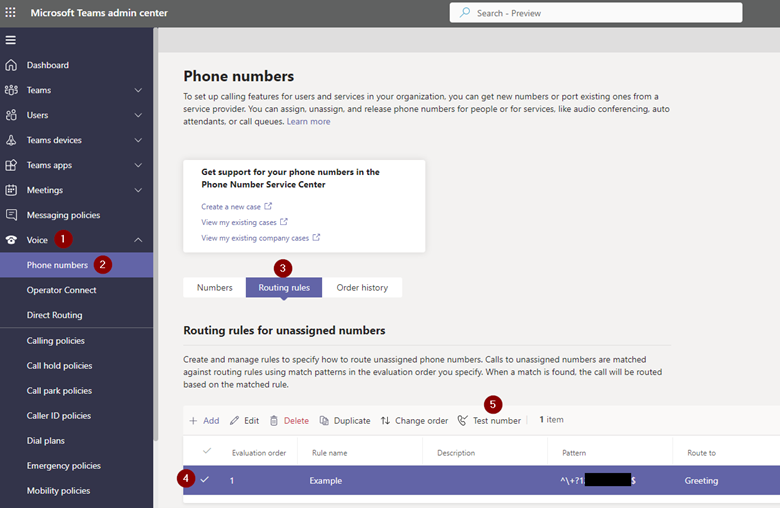
You can test your routing rules by using the Test number feature.
In the left navigation of the Microsoft Teams admin center, go to Voice > Phone Numbers.
On the Routing rules tab, click Test number. Enter a phone number directly or click Select a number and select one of your unassigned phone numbers from the drop-down. Select Test.
How to Configure Routing Unassigned Numbers Using PowerShell
To route calls to an unassigned number using PowerShell, use the New/Get/Set/Remove-CsTeamsUnassignedNumberTreatment cmdlet available in Teams PowerShell module 2.5.1 or later.
For more information see: https://learn.microsoft.com/en-us/microsoftteams/routing-calls-to-unassigned-numbers
Additional things to consider
When planning your routing rules, keep in mind the following:
- If routing to an announcement, the audio file will be played once to the caller.
- To route calls to unassigned Microsoft Calling Plan subscriber numbers, your tenant needs to have available Communications Credits.
- To route calls to unassigned Microsoft Calling Plan service numbers, your tenant needs to have at least one Microsoft Teams Phone Resource Account license.
- The custom audio file supported formats are WAV (uncompressed, linear PCM with 8/16/32-bit depth in mono or stereo), WMA (mono only), and MP3. The audio file content cannot be more than 5 MB.
- You are responsible for independently clearing and securing all necessary rights and permissions to use any music or audio file with your Microsoft Teams service. This may include intellectual property and other rights in any music, sound effects, audio, brands, names, and other content in the audio file from all relevant rights holders. Holders may include artists, actors, performers, musicians, songwriters, composers, record labels, music publishers, unions, guilds, rights societies, collective management organizations, and any other parties who own, control or license the music copyrights, sound effects, audio, and other intellectual property rights.
- Both inbound calls to Microsoft Teams and outbound calls from Microsoft Teams will have the called number checked against the unassigned number range.
- If a specified pattern/range contains phone numbers that are assigned to a user or resource account in the tenant, calls to these phone numbers will be routed to the appropriate target and not routed to the specified unassigned number treatment. There are no other checks of the numbers in the range. If the range contains a valid external phone number, outbound calls from Microsoft Teams to that phone number will be routed according to the treatment. (Microsoft Corporation, 2022)
I’m delighted to see Microsoft add this feature for Microsoft Teams. Routing rules aren’t difficult to implement and once they are configured, they don’t require much maintenance. Routing rules ensure that your caller will always get somewhere or to someone within your organization, even if there’s a misdial or an employee has left the organization and their number is no longer in use. Please reach out to us if you need any assistance with Microsoft Teams!
This publication contains general information only and Sikich is not, by means of this publication, rendering accounting, business, financial, investment, legal, tax, or any other professional advice or services. This publication is not a substitute for such professional advice or services, nor should you use it as a basis for any decision, action or omission that may affect you or your business. Before making any decision, taking any action or omitting an action that may affect you or your business, you should consult a qualified professional advisor. In addition, this publication may contain certain content generated by an artificial intelligence (AI) language model. You acknowledge that Sikich shall not be responsible for any loss sustained by you or any person who relies on this publication.