







Now that Microsoft has announced the end of all product enhancements, regulatory updates, and technical support for Microsoft Dynamics GP on December 31, 2029, with security patches ending on April 30, 2031, companies face a tough decision. What happens to all those customizations made in their ERP? Many businesses have invested time and resources tailoring Microsoft Dynamics GP to meet their needs through custom reports, SQL triggers, workflow enhancements, and third-party add-ons.
For those considering a move to NetSuite, the prospect of starting from scratch can be overwhelming. But the reality is more encouraging. NetSuite lets you tailor the system to your needs without painting yourself into a corner. You get the benefits of customizations in NetSuite without the usual headaches that make systems hard to update or scale later.
Why GP Customizations Create Long-Term Risk
Dynamics GP customizations often depend on on-premises infrastructure and external integrations. You may have built these customizations in SQL or used legacy plug-ins and third-party tools that can be difficult to maintain or migrate to modern cloud environments.
What’s more, many companies lack comprehensive documentation of changes over the years. Some platform customizations likely addressed temporary issues or business requirements that later became permanent. In both cases, this kind of patchwork makes it difficult to update the system or evaluate what still benefits the business.
Holding onto GP past 2029 also increases exposure to unpatched vulnerabilities and regulatory non-compliance risks.
How NetSuite Handles Customizations
NetSuite takes a different approach. It includes built-in tools for customizing workflows, reports, and interfaces: tools designed for flexibility without locking you into complex upgrades or risky workarounds. You can tailor the platform using visual builders, scripts, and pre-built integrations, all while maintaining compatibility with upgrades.
The table below shows how the most common types of GP customizations are handled in NetSuite using native capabilities:
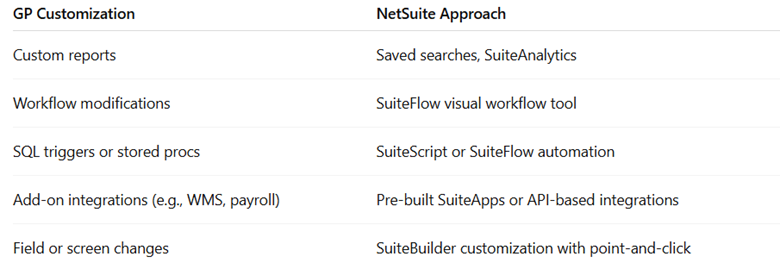
With NetSuite, customizations are an integral part of the everyday admin experience, rather than something that requires developer intervention. For example, making changes to a form or adding a custom field does not require editing code or installing a third-party add-on. You can use SuiteBuilder’s intuitive tools to drag and drop fields, configure forms, and tailor layouts by role or department.
This do-it-yourself customization reduces dependency on outside consultants and accelerates change management. Your internal team can more easily adjust the software to support their evolving needs. For example, they can update a workflow or add a new approval layer using built-in tools.
All these changes remain intact after version upgrades because NetSuite’s platform architecture separates custom logic from its core system updates. You avoid the need to reapply code changes with each release, and you eliminate the risk of breaking functionality when the platform evolves. Over time, this helps reduce the layers of custom scripts and external tools that often accumulate in legacy systems such as GP. The result is a more manageable environment with fewer upgrade delays and greater long-term stability.
NetSuite delivers these capabilities as part of the platform. You do not need separate tools or heavy development to get the necessary functionality.
Migrating Dynamics GP Customizations to NetSuite
During migration, your team or your implementation partner will assess which customizations still support critical business functions and which can be replaced or eliminated. Some customizations may no longer be needed, especially if NetSuite already supports that functionality out of the box.
Sikich begins each migration with a structured discovery process that documents every known customization in GP, from SQL-based workflows to field-level edits. We work closely with your team to identify which features are still actively used, which have workarounds, and which no longer serve a clear purpose. In many cases, what was once a custom report or plug-in in GP can be replaced with a native NetSuite feature, such as a saved search or SuiteApp. This approach enables your business to retain the functionality it needs while eliminating unnecessary technical complexity that slows down upgrades and increases support costs. Instead of rebuilding every feature, you update where it matters most.
Modernizing Customizations Without Losing Business Logic in NetSuite
GP helped your business grow, and the customizations you built over time likely reflect hard-earned knowledge about your organization’s operations. However, as that custom codebase ages, it becomes increasingly complex to maintain and more expensive to support. The same is true when existing employees leave, taking valuable system knowledge with them.
Over time, what once gave you a competitive edge can become a liability. Hanging onto that technical debt slows your ability to respond to changing requirements.
Instead of replicating every detail from GP, you can rebuild core functionality in a cleaner, more sustainable way.
- SuiteFlow lets you capture process logic through visual workflows.
- SuiteBuilder enables you to configure forms and fields without requiring any code modifications.
You no longer need to rely on workarounds or buried SQL to get the system working the way you want.
NetSuite also gives your team more control over ongoing improvements. With flexible dashboards and configurable tools, you can make updates when business requirements shift.
If you are planning for life after GP, talk with the Sikich team. We will help you assess your current environment and develop a system that is easier to manage and prepared for growth. Our team is well-versed in both Dynamics GP and NetSuite, enabling us to seamlessly translate your existing setup, supporting the continuity and long-term scalability of your business. We’ll help you move forward with confidence.
This publication contains general information only and Sikich is not, by means of this publication, rendering accounting, business, financial, investment, legal, tax, or any other professional advice or services. This publication is not a substitute for such professional advice or services, nor should you use it as a basis for any decision, action or omission that may affect you or your business. Before making any decision, taking any action or omitting an action that may affect you or your business, you should consult a qualified professional advisor. In addition, this publication may contain certain content generated by an artificial intelligence (AI) language model. You acknowledge that Sikich shall not be responsible for any loss sustained by you or any person who relies on this publication.