







While it is easy to add the Quantity and Quantity Received to a saved search, NetSuite does not provide a standard field to show the amount remaining to be received at the item or header level. This information can be very useful to your warehouse team, your buyers, and your accounting team. Whether you are looking for the missing quantities of a line item or the overall dollar amount to be received, you can use a formula to quickly show what is missing. Here’s how to calculate the amount remaining on a Purchase Order in NetSuite.
To determine the quantity remaining to be received for an item, you can subtract the Quantity Fulfilled/Received from the Quantity on that line. The formula will look like this in your Saved Search results:
Formula (Numeric) | {quantity}-{quantityshiprecv}
To determine the dollar amount waiting to be received, simply multiply by the Item Rate:
Formula (Currency) | ({quantity}-{quantityshiprecv})*{rate}
For example, if you want to see the remaining amounts on multiple POs, you can create a saved search like this:
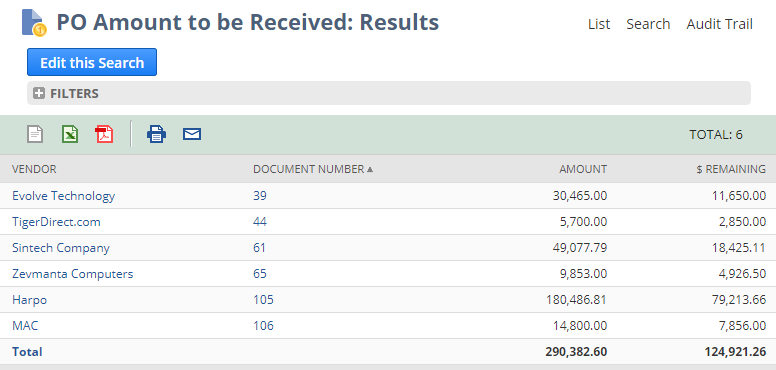
Criteria
- Main Line = F
- Tax Line = F
- Status = Purchase Order: Partially Received, Purchase Order: Pending Billing/Partially Received
Results
- Main Line Name | Group
- Document Number | Group
- Amount | Sum
- Formula (Currency) | Sum | ({quantity}-{quantityshiprecv})*{rate}
To determine quantity remaining to be received per item, simply add the {quantity}-{quantityshiprecv} formula to any line-level search:
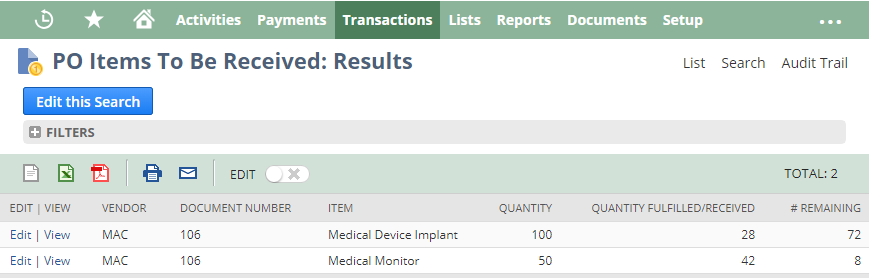
While these formulas are simple, they are flexible enough be used across multiple searches. You can determine the total number of items waiting to be received from a specific vendor, or if you purchase the same item from multiple vendors you can create a Purchase Order search and use a Group summary on Item to see how many you have not yet received.
EXTRA BONUS TIME!
Once you have mastered how to calculate the amount remaining on a NetSuite Purchase Order, you can apply it to NetSuite Sales Orders in the exact same way. Using {quantity}-{quantityshiprecv} will show the number of items that are remaining to be fulfilled from a given line on a Sales Order.
If you would like more information about anything in NetSuite, please contact us at any time! You can also learn about more great tips for NetSuite on our YouTube playlist or our other blog posts.
This publication contains general information only and Sikich is not, by means of this publication, rendering accounting, business, financial, investment, legal, tax, or any other professional advice or services. This publication is not a substitute for such professional advice or services, nor should you use it as a basis for any decision, action or omission that may affect you or your business. Before making any decision, taking any action or omitting an action that may affect you or your business, you should consult a qualified professional advisor. In addition, this publication may contain certain content generated by an artificial intelligence (AI) language model. You acknowledge that Sikich shall not be responsible for any loss sustained by you or any person who relies on this publication.