







In the October 2023 release of Dynamics 365 Business Central, users will have the ability to utilize multiple Customer and Vendor Posting Groups on Sales and Purchasing Documents. Here’s a step-by-step guide for configuring this functionality in the Sales & Receivables Module.
How to Configure Multiple Customer and Vendor Posting Groups in Business Central
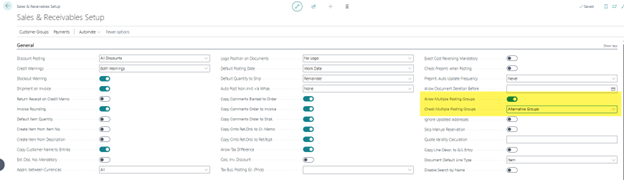
In the Sales & Receivables Setup window, turn on the Allow Multiple Posting Groups Option. The Alternative Groups option is the default setting.
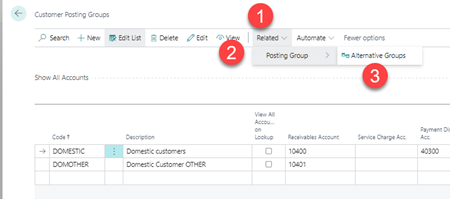
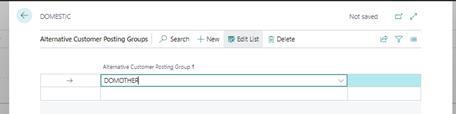
Within the Customer Posting Groups window, you can associate the Alternative Groups with each Posting Group.
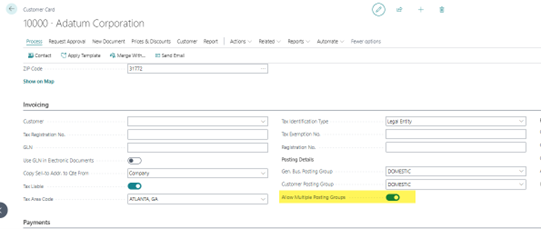
Users will then need to turn on the “Allow Multiple Posting Groups” option on the applicable Customer Cards.
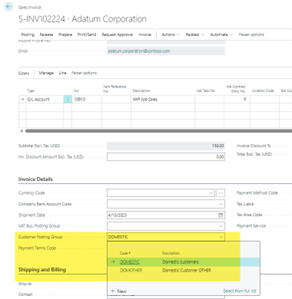
Once enabled, users will then be able to change the Posting Group on the Sales Document.
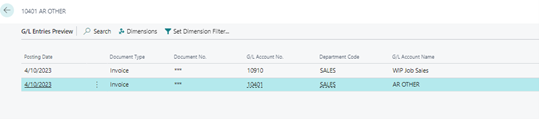
Open the Preview Posting Window. You will now see that this entry is using the Alternate AR Account for its Group Posting.
Repeat these steps for each alternative group as needed.
The October 2023 update will include other new features and updates in addition to this one, which you can find on Microsoft’s update page.
If you would like assistance with updating and preparing your Business Central environment to utilize Alternative Posting Groups, please contact our D365BC experts at any time.
This publication contains general information only and Sikich is not, by means of this publication, rendering accounting, business, financial, investment, legal, tax, or any other professional advice or services. This publication is not a substitute for such professional advice or services, nor should you use it as a basis for any decision, action or omission that may affect you or your business. Before making any decision, taking any action or omitting an action that may affect you or your business, you should consult a qualified professional advisor. In addition, this publication may contain certain content generated by an artificial intelligence (AI) language model. You acknowledge that Sikich shall not be responsible for any loss sustained by you or any person who relies on this publication.