







Lately, some software firms have made bold pledges: they’ll keep supporting Dynamics GP clients for years beyond Microsoft’s official end-of-life deadlines. At first glance, this sounds reassuring. Why rush a migration when you can simply rely on a technology partner to keep GP running?
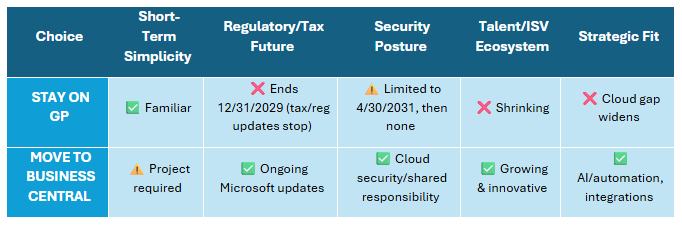
The problem is that these promises don’t change the facts. Microsoft has already defined the lifecycle of GP. After December 31, 2029, GP will no longer receive tax and regulatory updates. After April 30, 2031, even critical security patches will end. No technology partner can alter that roadmap. What they can offer is “best effort” support on a system Microsoft itself has stopped investing in.
So the question isn’t whether GP will technically keep running. It’s whether you want to depend on unofficial fixes, growing compliance risks, and a shrinking ecosystem while your competitors move forward.
Microsoft’s Roadmap for GP
Microsoft has already laid down clear markers, and they’re not open to interpretation. Dynamics GP is on the Modern Lifecycle, which means you’re only considered “supported” if you keep up with updates Microsoft releases. In practice, that means installing the October release each year, since that’s the designated major update. The June and December updates include the October changes, but skipping October leaves a gap where you’d technically be running unsupported.
Here are the milestones that matter most:
- Annual Updates Required: Install the October update each year to stay supported. June and December updates are optional but do not replace October as the requirement.
- December 31, 2029: Year-end payroll and tax updates stop. That means compliance with changing tax rules and reporting requirements will become increasingly difficult.
- April 30, 2031: Critical security fixes may be released through this date. After that, GP receives no further coverage.
- New Licenses Ending: Microsoft has already ended perpetual licenses for new customers, and GP subscription licenses for net-new customers will end April 1, 2026.
After those dates, GP will still technically run, but without Microsoft’s updates the system is frozen in time.
No third-party firm can extend that timeline, no matter what they promise. They can offer troubleshooting, workarounds, and creative patching, but they cannot deliver official tax tables, new features, or long-term security coverage.
Why “Extended Support” Pledges Are a False Sense of Security
Third-party support offers can sound like a safety net, but they come with major limitations:
- No tax or compliance updates. Partners can’t issue official payroll or 1099 updates after Microsoft stops.
- No guaranteed security coverage. Once Microsoft ends patching, your system is frozen in place.
- Shrinking expertise. More ISVs and consultants are focusing on Dynamics 365, not GP, which makes finding skilled resources harder each year.
- Added cost without added value. Paying for unofficial support simply prolongs your reliance on a system with an expiration date.
It’s the equivalent of maintaining a building after the utility company has cut off water and electricity. You may still be inside, but it’s not sustainable.
GP vs. Business Central: A Straight-Talk Comparison
The Benefits of Moving to Business Central
Organizations that migrate from GP to Dynamics 365 Business Central find the difference goes far beyond compliance. Month-end close becomes routine instead of stressful. Reporting moves from static exports to real-time dashboards in Power BI. Multi-entity consolidation is simplified.
And with Microsoft Copilot embedded in BC, finance teams unlock AI-driven productivity:
- AI assists with reconciliations, spotting anomalies, and preparing adjustments.
- Leaders can ask natural-language questions of their data for instant answers.
- Collection emails and customer follow-ups are drafted automatically.
- Forecasting becomes forward-looking instead of reactive.
These aren’t just technology upgrades; they’re the foundation for modern, efficient finance operations.
Frequently Asked Questions
1. Why can’t I just stay on GP if it still works?
You can, but after 2029 you’ll lose tax and regulatory updates, and after 2031 security updates stop too. That means compliance gaps, higher audit risk, and greater vulnerability to cyber threats.
2. What does the migration process look like?
Sikich helps you plan every step: from assessing your current GP system and identifying must-have features to migrating your data and training your team. Post-go-live support ensures the transition is smooth.
3. How long does a migration take?
It depends on scope. With Sikich’s GP to BC HeadSTART services, organizations using GP primarily for GL and accounting can be live in as few as 8 weeks. Larger environments may take longer, but careful planning keeps disruption low.
4. How do I know if my GP environment is ready?
Our Migration Assessment Tool scans your system for modules, ISVs, and data condition. It highlights potential issues early so they can be addressed before migration.
5. What data can I bring with me into BC?
Core master data, open transactions, and historical ledgers all move over, ensuring continuity while leaving unnecessary baggage behind.
6. What if my system doesn’t qualify for the migration tool?
Not every environment does, but Sikich has successfully migrated GP clients on all versions. We have multiple approaches to make sure no one is left behind.
7. How do I choose between Business Central and Finance & Supply Chain?
Business Central fits most GP organizations. For those with global operations or highly complex supply chain needs, Dynamics 365 Finance & Supply Chain Management may be the better fit. Our ERP selection consultation helps you make the right decision.
Next Steps: Choose Your Path Forward
Sikich offers multiple ways to begin your move:
- Free GP Migration Assessment Tool – Get tailored recommendations based on your current GP environment.
- Dynamics GP to Dynamics 365 Workshop & AIM Assessment – A structured workshop leveraging Sikich’s 25+ years of Dynamics expertise.
- Microsoft’s AIM Program Incentive – Special bridge-to-the-cloud offers to make migration more affordable.
- GP to BC 8-Week Implementation – Get live in as few as 8 weeks with our HeadSTART approach.
- GP to F&SCM HeadSTART Migration – For larger organizations with complex needs.
- ERP Selection Consultation – Let our experts help you evaluate the right fit and create a roadmap.
Final Word
Third-party pledges to extend Dynamics GP support may sound like a safe option, but they don’t restore tax updates, extend security coverage, or solve the shrinking ecosystem problem. They simply prolong your reliance on software Microsoft has already put on a clock.
The smarter move is to start planning now. By migrating to Business Central or Finance & Supply Chain, you’ll not only eliminate the risks of running unsupported software, you’ll gain the modern tools—automation, analytics, AI—that position your organization for the future. Contact us to get started today!
This publication contains general information only and Sikich is not, by means of this publication, rendering accounting, business, financial, investment, legal, tax, or any other professional advice or services. This publication is not a substitute for such professional advice or services, nor should you use it as a basis for any decision, action or omission that may affect you or your business. Before making any decision, taking any action or omitting an action that may affect you or your business, you should consult a qualified professional advisor. In addition, this publication may contain certain content generated by an artificial intelligence (AI) language model. You acknowledge that Sikich shall not be responsible for any loss sustained by you or any person who relies on this publication.