







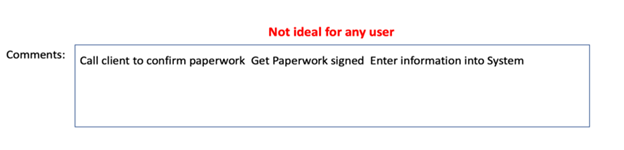
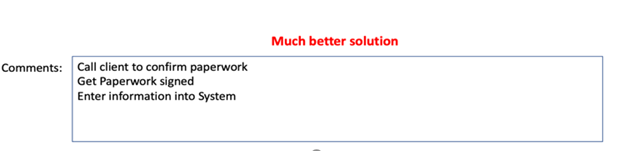
Having built many business processes over the years, I have been frustrated by the lack of formatting for the Comments field on a task record. I doubt I’m the only one. As tasks are automatically created, I want to provide users with a very easy-to-follow list of things to do. However, the Task object does not have Rich Text field capability, so I am left with a less than a visually appealing solution. I’ve provided some examples below.
This is what it would look like in Salesforce sans my user tip.
This is what I want it to look like in Salesforce.
Any business process can have 5-10 steps or tasks associated with it. When the process is kicked off, each task needs to be assigned to the correct person with a clear description of what needs to be done. The good news is that there is a solution to make this happen. Even better news, I’m going to share how to do it.
How to Format a Non-Rich Text Field for Salesforce Tasks
If you are using Process Builder to build out the tasks to be automatically created when a process is launched, you will put the following into the Value for the Description field.
Call client to confirm paperwork | Get Paperwork signed | Enter information into System
Even though we are updating the Comments field, we need to set the Value for the Description field.

In addition to putting a “|” into that field where you want a line break, you must also build a separate rule (Workflow, Process Builder or Flow) that runs on a Task record when the Created Date is NOT EQUAL to NULL. Since every task will have a Created Date, this process will always run, and the formula is SUBSTITUTE(Description, “|”, BR()).
This will substitute the “|” for a line break, and since it runs all the time, it will make the Comments field more user-friendly. I’m not sure why we are not able to create rich text fields on the Activity object, as this would make it much easier for all users to use this workaround. I have heard that Workflow and Process Builder will eventually go away in favor of Flow to be the ultimate solution. However, I built mine using Workflow. Even if they phase out Workflow and Process Builder, I hope that any legacy processes can still run the way they were built to run.
This solution is primarily used for Salesforce Tasks because of the inability to create a Rich Text Field. However, you can use it anywhere. Having trouble with something else in Salesforce? Tell us what other tips would be helpful for you!
This publication contains general information only and Sikich is not, by means of this publication, rendering accounting, business, financial, investment, legal, tax, or any other professional advice or services. This publication is not a substitute for such professional advice or services, nor should you use it as a basis for any decision, action or omission that may affect you or your business. Before making any decision, taking any action or omitting an action that may affect you or your business, you should consult a qualified professional advisor. In addition, this publication may contain certain content generated by an artificial intelligence (AI) language model. You acknowledge that Sikich shall not be responsible for any loss sustained by you or any person who relies on this publication.