







Saved views bring enhancements to the personalization feature of Microsoft Dynamics 365 Finance and Operations (D365FO). Previously, the platform limited users to just one personalization of a list page. As a result, changing back and forth between personalized views with different columns and filters was cumbersome. This new D365FO saved views feature allows a user to have multiple named sets of personalization per page.
These personalizations can include adding or removal of columns. On lists pages, personalizations include filters. For example, if a user frequently filters vendors with overdue payments or payments on hold, the user can configure saved views for each use case as depicted in the picture below.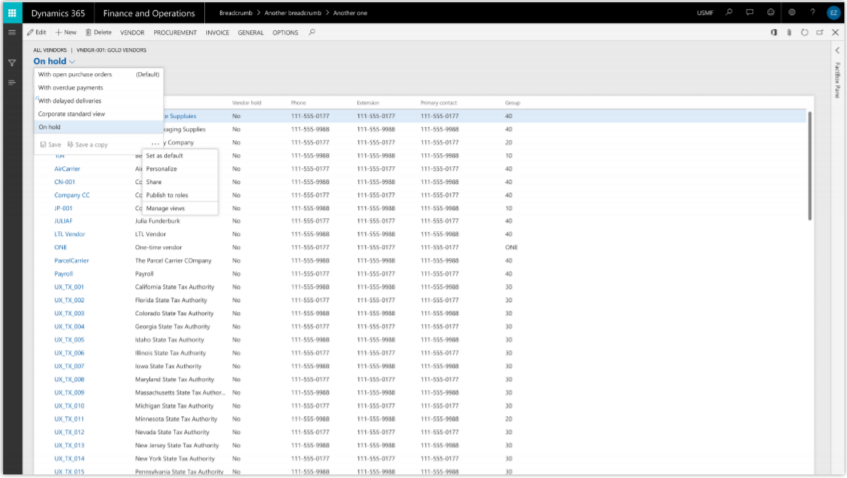
In addition, users can pin these saved views to their home screen as tiles, allowing them to access these views immediately upon opening D365FO. Users can also pin saved views as the default, thereby showing the designated view upon opening a page or list. However, users must be careful to remember they may have enabled a saved view, especially with the use of filters that could limit records and lead to confusion.
D365FO Saved Views for Management
The D365FO saved views also provides updates to the management of personalization within an organization. Previously, administrators could assign a single personalization to users but could not prevent them from further personalizing a page. This shortcoming could potentially lead to frustrating inconsistencies across a user base, making end user support difficult. The saved views feature allows managers to assign views to users (if they wish) so that the users cannot alter them.
Additionally, this feature allows for a business to define standard views that are tailored for their company’s business processes as well as for a user’s security roles. Note that any existing personalizations for a user will automatically save to a a view titled “My View” when enabling views.
Have any question about how to use saved views? Please reach out to our team at any time!
This publication contains general information only and Sikich is not, by means of this publication, rendering accounting, business, financial, investment, legal, tax, or any other professional advice or services. This publication is not a substitute for such professional advice or services, nor should you use it as a basis for any decision, action or omission that may affect you or your business. Before making any decision, taking any action or omitting an action that may affect you or your business, you should consult a qualified professional advisor. In addition, this publication may contain certain content generated by an artificial intelligence (AI) language model. You acknowledge that Sikich shall not be responsible for any loss sustained by you or any person who relies on this publication.