







One challenge I encounter more frequently when I perform an email migration is having to recreate users’ Outlook profile in a Remote Desktop Service (RDS) environment. Recently, I was tasked with an Office 365 migration for over 150 users, where an RDS environment was in use for email and collaboration. This environment included Windows Server 2012 R2, Microsoft Office 2016, and an Active Directory Domain.
Overview:
- Create registry key for Outlook profile to install on user login; registry file placed in NETLOGON share.
- Remove SCP Autodiscover service entry for local on-premises Exchange within Active Directory.
- Update DNS Autodiscover entries to point to Office 365 via CNAME.
- Create Group Policy Object with new organizational unit and move RDS servers there.
The steps to accomplish this task are explained in detail below:
- Start with creating a .reg file in notepad that contains the follow registry keys associated with the Outlook profile. Note the section in red, this is the expected Outlook “profile name.”reg add HKCUSoftwareMicrosoftOffice16.0OutlookProfilesOffice365
reg add HKCUSoftwareMicrosoftOffice16.0Outlook /v DefaultProfile /t REG_SZ /d “Office365” /F - Next, log into Active Directory Sites and Services, navigate to the Services node, and remove the SCP entry for the Exchange Autodiscover record. See below for path to find the service.CN=Autodiscover,CN=Protocols,CN=ServerName,CN=Servers,CN=Exchange Administrative Group,CN=Administrative Groups,CN=First Organization,CN=Microsoft Exchange,CN=Services
- DNS management is next — verify that the internal Autodiscover A and SRV records are removed, and create a CNAME record to point to Offce365 at autodiscover.outlook.com.
- Finally, create a new GPO with the following settings and apply this to the RDS organizational unit inside Active Directory that contains the RDS servers. Reboot the RDS servers to apply the policies.
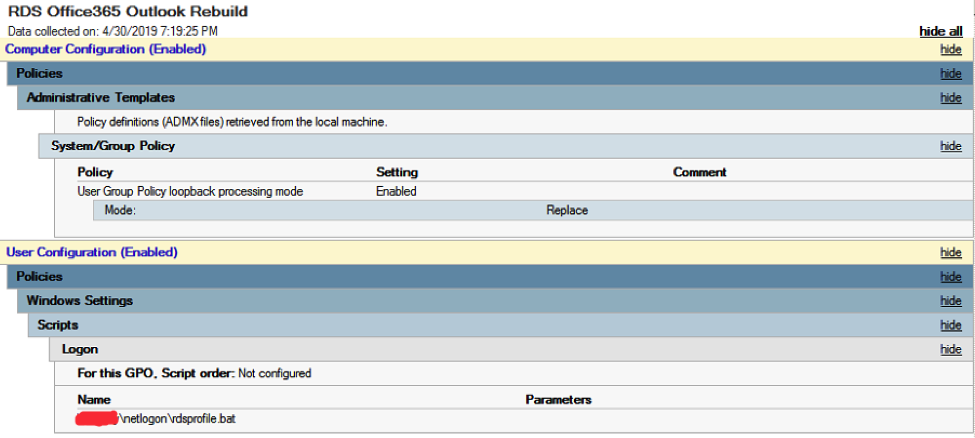
- Now, the next time a user logs into an RDS server, they get presented with a new profile window when launching Outlook. All they need to do is click Next and the profile is configured to connect to Office 365.
This was highly successful and made for an extremely smooth migration for all parties involved.
Do you have a Remote Desktop Services environment in which you’ve been struggling, or have a lack of confidence to move to Office 365 because of the amount of manual effort needed? Contact the Sikich team to start your migration to Office 365 today and rest easy tomorrow!
This publication contains general information only and Sikich is not, by means of this publication, rendering accounting, business, financial, investment, legal, tax, or any other professional advice or services. This publication is not a substitute for such professional advice or services, nor should you use it as a basis for any decision, action or omission that may affect you or your business. Before making any decision, taking any action or omitting an action that may affect you or your business, you should consult a qualified professional advisor. In addition, this publication may contain certain content generated by an artificial intelligence (AI) language model. You acknowledge that Sikich shall not be responsible for any loss sustained by you or any person who relies on this publication.