







The new NetSuite 2017.1 release has enhanced the user experience in a variety of ways, one of which is the CSV import function. NetSuite has added two new features to using the CSV import function: consolidated exchange rate updates and large custom list imports.
CSV Import Supported for Consolidated Exchange Rate Updates
Users are now able to import from CSV files to update consolidated exchange rate record data in NetSuite. If your organization uses OneWorld, has multiple subsidiaries with different base currencies, and manually edits various consolidated exchange rates, then take advantage of this enhancement!
First, navigate to List > Accounting > Consolidated Exchange Rates and view a current exchange rates. Before updating a record via import, it is always a good idea to familiarize yourself with the fields of this record.
Notice the following fields. These are the fields on the record that you can map to and update.
- Average Exchange Rate
- Current Exchange Rate
- Historical Exchange Rate
NetSuite also requires an external ID or an internal ID to uniquely identify the consolidated exchange rate you are updating.
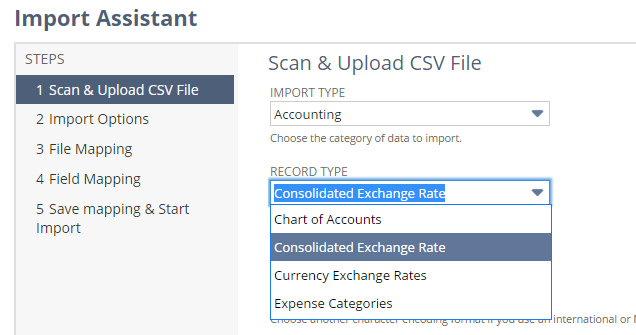
To import updated consolidated exchange rate data, navigate to Setup > Import/Export > Import CSV Records. Only the Update data handling option is available for the import of this type of data.
Large Custom List Imports Supported
Users are also now able to import a much larger amount of data than previously. CSV Import now supports the import of custom lists that have up to 25,000 values. The import Assistant checks to ensure that the custom list you are importing has 25,000 values or less before proceeding with the import.
If you would like more information abut the new CSV import function features, please contact us at any time. You can also learn about more great tips for NetSuite on our YouTube playlist or our other blog posts.
This publication contains general information only and Sikich is not, by means of this publication, rendering accounting, business, financial, investment, legal, tax, or any other professional advice or services. This publication is not a substitute for such professional advice or services, nor should you use it as a basis for any decision, action or omission that may affect you or your business. Before making any decision, taking any action or omitting an action that may affect you or your business, you should consult a qualified professional advisor. In addition, this publication may contain certain content generated by an artificial intelligence (AI) language model. You acknowledge that Sikich shall not be responsible for any loss sustained by you or any person who relies on this publication.